

Your source app says the webhook was sent, but Zapier shows no useful test record. Or the request returns HTTP 200, yet the contact, spreadsheet row, or notification never appears.
When a Zapier webhook is not receiving data, start by separating three questions: Did the sender make the request? Did the intended trigger receive the expected payload? Did the workflow complete the intended action? Evidence for one does not establish the others.
This guide focuses on incoming Webhooks by Zapier triggers. It provides a controlled test request, a symptom-based checklist, and a recovery procedure that avoids blindly repeating completed work. If your Zap already receives the event and fails while sending a request to another API, start with that action’s input and response instead.
Quick check: Record the source event ID and delivery time, compare the configured destination with the URL in the intended Zap, then send one small JSON payload to an isolated diagnostic trigger. Find that exact payload in Zapier before changing mappings or retrying business actions.
Scope and verification: These are documentation-based diagnostic instructions and illustrative examples, not results from a live test of your Zap. Use dummy records and a test destination. Confirm account features and current interface labels in your own workspace.

Find your next check
- Find your starting point
- 1. Preserve the failing example before changing anything
- 2. Confirm that the source generated a delivery attempt
- 3. Compare the actual destination with the intended Zap
- 4. Send one controlled JSON request
- 5. Read the response without confusing it with workflow completion
- 6. If the test works, compare the real request
- 7. Fix missing fields at the correct layer
- 8. Check live execution separately from editor tests
- 9. Investigate burst failures and oversized requests
- 10. Explain extra runs before adding deduplication
- Worked example: the sender succeeds, but the wrong Zap receives the event
- Recover missed work without repeating successful actions
- Acceptance checklist before normal processing resumes
- What to include in a support request
- Frequently asked questions
Find your starting point
You do not need to work through every check. Choose the row matching the evidence you already have.
| What you observe | First check | Evidence to collect |
|---|---|---|
| Source app has no delivery attempt | Event configuration | Event subscription, environment, and record change |
| Source reports delivery, but Zapier has no matching data | Destination and controlled request | Exact URL, request time, HTTP response |
| Test panel only shows an old example | Fresh diagnostic marker | A newly sent, uniquely identifiable payload |
| Trigger contains data, but expected fields are absent | Payload structure | Raw source body and selected trigger record |
| HTTP 200, but no business result | Zap state and execution history | Matching event, run status, and action output |
| HTTP 404 | Current endpoint and Zap state | URL from the intended Zap and published state |
| HTTP 429 or delayed runs during bursts | Delivery rate | Request volume, response timestamps, queue evidence |
| Workflow runs more than expected | Deliveries and event identity | Event IDs, retry attempts, array structure |
| Tests work, but production events do not | Environment differences | Test versus production subscription and destination |
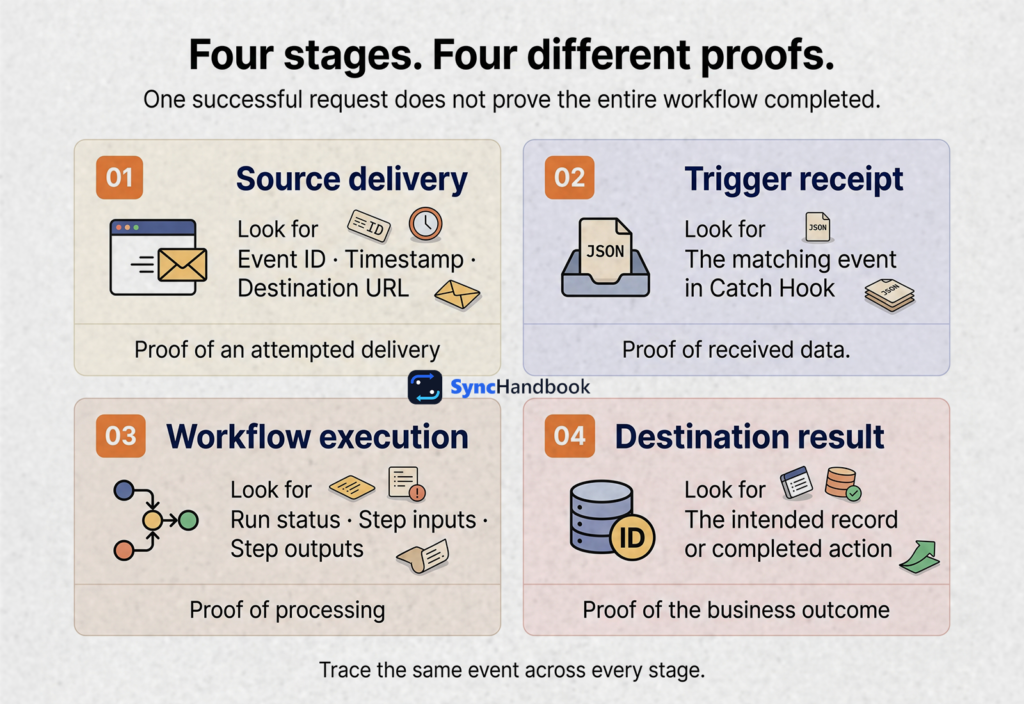
Use this article in order when you have no evidence yet. Otherwise, jump to the relevant section and finish with the recovery and acceptance checks.
1. Preserve the failing example before changing anything
Choose one missing event. Record its business record ID, event type, approximate creation time, and source environment. Add the sender’s delivery ID if available.
Do not start by deleting the Zap, recreating the webhook, reconnecting every app, or resending a day’s worth of events. Those changes can remove the evidence needed to explain the original failure.
Create a short incident note:
Source environment: sandbox
Business record: lead_demo_1042
Expected event: lead.created
Source event ID: evt_demo_1042
Delivery attempt: inspect in source delivery log
Delivery time: record timestamp and timezone
Expected Zap: Lead intake diagnostic
Observed result: no matching trigger record foundKeep the original payload privately if your policies allow it. For shared debugging notes, replace customer names, email addresses, tokens, and confidential fields with dummy values while preserving the structure.
Separate a business record ID from an event ID. One lead can produce several legitimate events. Conversely, several delivery attempts can belong to one event. Losing that distinction makes later duplicate analysis unreliable.
Before testing, identify which downstream actions can create records, send messages, or change billing. A diagnostic request should not accidentally invite a real customer into a workspace.
2. Confirm that the source generated a delivery attempt
A record appearing in your source application does not establish that a webhook was emitted for it.
Inspect the source’s webhook subscription or equivalent configuration. Check the selected event, the relevant project or account, and whether the subscription is enabled. Then look for a delivery attempt associated with the chosen event.
For example, a subscription to lead.created may not emit another event when you edit an existing lead. A test button may also send a sample event with a different shape from a real creation event. Consult the source application’s event documentation rather than inferring behavior from a button label.
Use this distinction when deciding what to investigate next:
| Source evidence | Interpretation | Next move |
|---|---|---|
| No matching event and no delivery attempt | Failure may precede webhook delivery | Check event selection and source behavior |
| Event exists, but delivery is queued | Sender has not completed delivery | Inspect the sender’s queue and schedule |
| Delivery attempt has a network error | Transport outcome needs investigation | Inspect DNS, TLS, timeout, or connection details |
| Delivery attempt includes an HTTP response | An endpoint answered | Verify the exact destination and response |
If the application provides no delivery logs, ask its owner or support team for the attempted URL, timestamp, HTTP method, response status, and redacted request body. “Webhook enabled” is configuration evidence, not delivery evidence.
3. Compare the actual destination with the intended Zap
Open the correct Zap in the correct workspace. Copy its webhook URL from the trigger and compare it privately with the destination saved in the source application.
Look for a different endpoint belonging to an old test Zap, another environment, or a previous owner. Do not compare only the hostname. The complete path identifies the destination.
Zapier’s trigger documentation notes that ownership transfers can change webhook URLs. Include endpoint verification in any handover involving a different owner. Zapier webhook setup and ownership
Keep a small internal endpoint inventory:
| Environment | Source subscription | Intended Zap | Last verified |
|---|---|---|---|
| Sandbox | Test lead-created subscription | Diagnostic intake | Record the actual check date |
| Production | Live lead-created subscription | Production intake | Record the actual check date |
Store complete URLs in an access-controlled location. Zapier advises treating a Catch Hook URL as a secret because someone who obtains it can send requests that trigger the Zap. Avoid exposing it in screenshots, public code, or browser-side JavaScript. Webhooks by Zapier security guidance
If you find a wrong URL, document the old and intended destinations before updating the source. Check whether the old destination already processed any events before replaying them elsewhere.
4. Send one controlled JSON request
Use a separate diagnostic Zap with a Webhooks by Zapier trigger. Keep downstream actions restricted to disposable test data. For ordinary structured JSON, start with Catch Hook; Catch Raw Hook is useful when you need unparsed content and request headers. Trigger options
This first test uses a flat object so nested fields cannot hide the result. Save the following as webhook-test.json.
Language: JSON
{
  "diagnostic_id": "sh-hook-check-001",
  "event_id": "evt_demo_1042",
  "event_type": "lead.created",
  "record_id": "lead_demo_1042",
  "email": "reader@example.com",
  "environment": "sandbox"
}The diagnostic_id is a field introduced for this guide. It is not a required Zapier parameter or an automatic deduplication setting.
From the directory containing the file, run the following command in Bash on macOS, Linux, or WSL. Replace the placeholder with your diagnostic webhook URL. Do not send this to a production workflow that performs real actions.
Language: Bash
curl --include --silent --show-error \
  --connect-timeout 10 \
  --max-time 30 \
  --request POST \
  --header 'Content-Type: application/json' \
  --data-binary @webhook-test.json \
'PASTE_YOUR_DIAGNOSTIC_WEBHOOK_URL_HERE'The command displays the response headers and body. It intentionally does not enable automatic retries or follow redirects, making the first result easier to interpret. Keep your terminal output private if it contains identifying details.
If you prefer Postman, create a POST request to the same diagnostic URL, select a raw JSON body, paste the object above, and send it once. Zapier recommends a custom request as a way to isolate the receiving trigger from the source application. Zapier’s troubleshooting procedure
Return to the trigger’s Test tab and request a fresh record. Locate sh-hook-check-001 rather than selecting an older sample that happens to contain an email address.
For the next independent diagnostic request, change the marker to sh-hook-check-002. When investigating an actual retry, retain the original business event identity and record the delivery attempt separately.
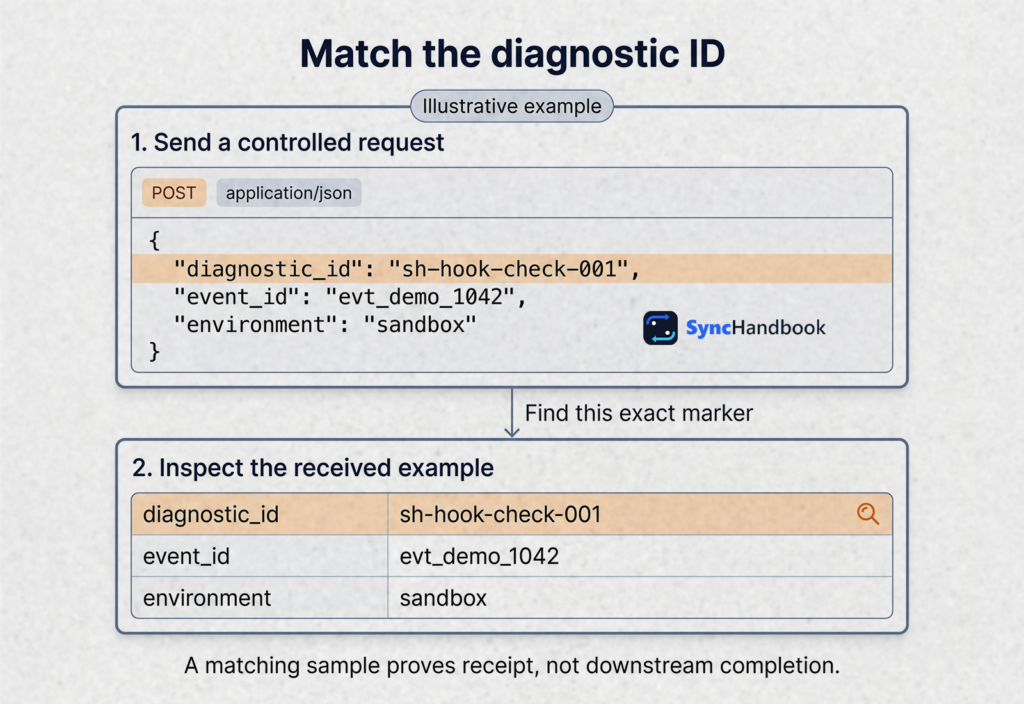
What the controlled test establishes
If the diagnostic trigger receives your JSON, that endpoint can accept this payload from your test client. It does not establish that the original source can reach it, that the production URL is correct, or that downstream actions are configured properly.
If the test fails, record the response before changing anything. Check the URL, trigger state, and request body. A failed command caused by a missing local file is different from an HTTP error returned by Zapier.
5. Read the response without confusing it with workflow completion
Separate the sender’s HTTP result from the Zap’s business result.
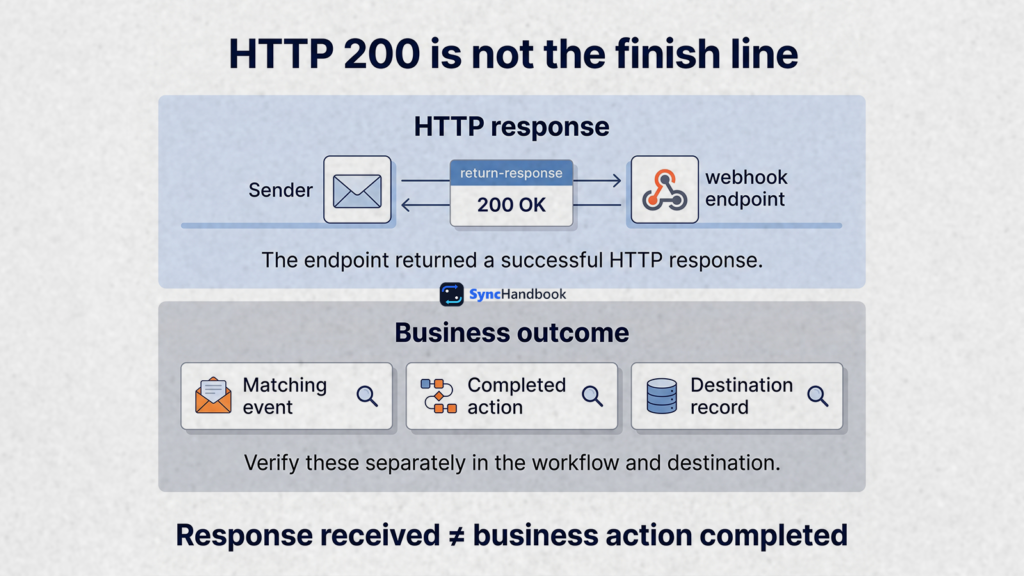
Zapier documents that a disabled or deleted Zap can return 404, with a delay before that behavior takes effect. Separately, its rate-limit guidance explains that webhook processing can be delayed even when the endpoint returns 200. Webhook response behavior · Webhook rate limits
Some general help text describes responses differently. For diagnosis, use the observed response together with the Zap’s current state and matching execution evidence. Do not use a status code alone as your workflow health check.
| Result | Check next | Avoid assuming |
|---|---|---|
| 200 | Matching trigger data and run history | The destination record was created |
| 404 | Exact URL and intended Zap state | All customer records are lost |
| 429 | Sending rate and retry schedule | Repeated immediate retries will help |
| 5xx | Response details and later execution evidence | No processing happened anywhere |
| Timeout with no response | Sender logs and matching event history | The receiver definitely received nothing |
| Unexpected HTML or redirect | Actual destination and any intermediary | The intended webhook returned that page |
A sender timing out creates an uncertain outcome: the receiver may have accepted work before the sender stopped waiting. Search for the event before deciding whether a fresh delivery is necessary.
6. If the test works, compare the real request
Keep the working diagnostic request as your baseline. Now capture one real request from the source’s test environment and compare it with that baseline.
Check the HTTP method, complete destination, content type, body structure, body size, and event selection. Change one relevant variable at a time so you can identify which difference matters.
For JSON, verify that the body is actually a JSON object, not a string containing serialized JSON. These are different structures:
Language: JSON, object
{"event_id":"evt_demo_1042","record_id":"lead_demo_1042"}Language: JSON, string containing JSON text
"{\"event_id\":\"evt_demo_1042\",\"record_id\":\"lead_demo_1042\"}"Both are valid JSON values, but only the first is the object intended by this example. Look at what the HTTP client actually sends rather than what the configuration editor appears to contain.
Also check for an empty request body. Zapier states that completely empty webhook requests are ignored. A browser visit without useful payload data is therefore a poor substitute for the controlled test above. Webhook payload guidance
If a request inspection service is necessary, use synthetic data and a separate test subscription. Redirecting the only production webhook to a debugging service can interrupt business processing and expose customer data. A request arriving at an inspection endpoint proves delivery to that endpoint, not delivery to Zapier.
7. Fix missing fields at the correct layer
Once the trigger contains the expected event, stop treating every missing value as a delivery problem.
Compare three things: the source payload, the selected trigger record, and the input mapping of the first affected action.
Consider this nested payload:
Language: JSON
{
  "event_id": "evt_demo_1043",
  "event_type": "lead.created",
  "data": {
    "lead_id": "lead_demo_1043",
    "email": "reader@example.com",
    "company": {
      "name": "Example Company"
    }
  }
}Catch Hook offers a Pick Off A Child Key setting to select part of the incoming body. If that setting selects data, inspect the resulting sample before expecting top-level fields such as event_id to remain available. Catch Hook configuration
For diagnosis, inspect the complete object first unless the integration specifically requires a selected child. Confirm where the event identity and business identity live, then map from the actual sample.
| Field problem | Likely layer | Correction to investigate |
|---|---|---|
| Field is absent from the source body | Sender | Select the right event or retrieve required data separately |
| Field exists in the body but outside the selected child | Trigger configuration | Review the child selection |
| Field appears in a new sample but not the old sample | Test data | Select representative fresh data and review mappings |
| Field exists in the trigger but action input is blank | Mapping | Select the intended output field |
| Action input is correct but rejected | Destination API | Inspect validation rules and error details |

Do not mask a required missing identifier with a convenient default. A blank customer ID should stop or route to review, not fall back to whichever customer happened to be used during setup.
For workflows passing identifiers into spreadsheets, our Google Sheets identifier preservation guide explains the separate issue of values changing after receipt. Its Make-specific steps differ, but the distinction between delivery and data integrity applies here too.
8. Check live execution separately from editor tests
A successful trigger test is useful evidence. It is not an end-to-end acceptance test.
For the intended live workflow, confirm that the desired configuration is published and enabled. Then create one controlled source event and inspect the matching run in Zap History.
Follow that run step by step. Compare the event identity, filter inputs, branch conditions, action inputs, and returned destination record. If a step did not run, establish whether the workflow deliberately stopped or encountered an error.
For example, a filter requiring environment = production should stop the sandbox payload used earlier. Removing that filter simply to make the test green would change the workflow’s intended behavior.
Use a dedicated test destination for the final action. An internal test spreadsheet or disposable CRM record can demonstrate the mapping without contacting real customers. Do not assume every integration offers a dry-run mode.
If a run exists with the correct trigger data, an expired connection or rejected field in a later action is a downstream problem. Repair that step rather than replacing a working incoming webhook.
9. Investigate burst failures and oversized requests
An integration that succeeds for individual events but fails during an import needs a volume-focused investigation.
Record how many requests the sender attempted and over what interval. Compare that with response codes and the timing of visible Zap runs. Also identify which service returned the error: the webhook receiver and a later CRM action have separate limits.
Zapier currently documents a webhook limit of 20,000 requests per five minutes per user, with a separate lower limit for legacy routes. Its guidance recommends exponential backoff for retries and notes that processing can be delayed under high activity. Check the current limits before designing bulk delivery. Webhooks by Zapier rate limits
A Delay step later in the workflow cannot reduce requests that have already arrived at the webhook endpoint. If the sender is overwhelming intake, control delivery at the sender or an upstream queue.
For retries, define a maximum attempt count, increasing delays, and an escalation path. Retain the original event ID. A corrected request should remain traceable to the business event that caused it.
For large bodies, compare the actual request size with the documented limit for your trigger. Catch Raw Hook has a smaller allowance than the general webhook trigger limit. Payload size limits
If a record includes an entire document or attachment, consider whether the event can contain a reference followed by an authenticated retrieval step. Do not replace private file access with a public link merely to shrink the request.
10. Explain extra runs before adding deduplication
When you expect one result and see several, compare event identities and request structure before assuming Zapier duplicated the webhook.
Possible explanations include repeated sender deliveries, two subscriptions pointing at the workflow, multiple legitimate event types, or a request containing several records.

Zapier documents that a top-level array of objects can produce separate runs for the objects. A wrapped array inside an object is treated differently. Confirm the structure before using a bulk payload as a single-event test. Array behavior
A field named event_id does not make arbitrary downstream actions automatically idempotent. Define the intended rule for each operation. Creating a contact, updating a subscription, and sending a reminder can require different business identities.
A basic lookup followed by create also needs concurrency analysis. Two simultaneous runs can both find no existing record. Where duplicate prevention is essential, use a destination-supported unique constraint, an idempotent API operation, or coordinated processing that has been tested under concurrent delivery.
Keep this investigation separate from missing data. First prove what arrived. Then prove how many business actions should have happened.
Worked example: the sender succeeds, but the wrong Zap receives the event
Consider an illustrative lead intake integration with a sandbox Zap and a production Zap. A team member completed testing, then enabled the production workflow. New leads appear in the source, but production has no matching runs.
The first useful clue is a source delivery log containing a 200 response. Instead of resending every lead, the operator compares that delivery’s full destination URL with the production trigger.
They differ. The source still points to the sandbox endpoint.
Next, the operator finds the missing event ID in the sandbox workflow. This establishes where the event went and whether any test actions already occurred. A separate controlled event sent through the corrected source configuration then appears in production and reaches the intended test destination.
The recovery decision comes after that validation. The operator identifies affected event IDs, checks whether any real destination records already exist, and reprocesses only the work still needed. The incident note records the configuration error, affected interval, and confirmed outputs.
This example is not a reported customer case. It demonstrates why endpoint evidence is more useful than repeatedly asking whether the source “sent successfully.”
Recover missed work without repeating successful actions
Fixing the configuration and repairing historical data are separate tasks.
First, identify the affected time window. Build a list of source events that should have been processed during that interval. Exclude events that legitimately fall outside the workflow’s subscription or filter rules.
Next, classify each event:
| Evidence | Recovery decision |
|---|---|
| No confirmed receipt and no destination result | Consider controlled redelivery after the fix |
| Received, with an action failure | Review that run and repair the failed stage |
| Destination result exists, but a later step failed | Preserve the existing result and complete missing work |
| Correctly stopped by a business rule | No replay unless the rule or input was wrong |
| Outcome cannot be established | Investigate before creating another result |

For state updates, determine whether the old event still represents the desired state. A delayed “active” update should not overwrite a newer cancellation simply because it is replayed later.
Select one low-risk event as a recovery pilot. Verify the destination result and audit trail, then process a small batch. Reconcile source records against confirmed outputs before expanding the batch.
When the workflow manages appointments, our duplicate calendar event guide discusses stable business identity and recovery after uncertain writes. It is a Make implementation, so adapt the design rather than copying module settings into Zapier.
Acceptance checklist before normal processing resumes
Record actual results, not just green indicators in the editor.
| Test | Passing evidence |
|---|---|
| Flat diagnostic object | Exact diagnostic marker appears in the intended trigger |
| Fresh source event | Source event ID matches received data |
| Correct environment | Source subscription and Zap belong to the intended environment |
| Representative nested payload | Required fields remain available and map correctly |
| Missing required field | Workflow stops or routes to review before an incorrect write |
| Live workflow | One controlled event reaches the intended test destination |
| Repeated delivery | Business result follows the documented duplicate-handling rule |
| Later action failure | Recovery preserves already completed work |
| Expected burst | Intake and downstream limits are respected |
| Handover | Owner, endpoint location, and recovery notes are documented |

Only run tests appropriate to your environment. Do not manufacture load against a production endpoint to discover its breaking point. Record untested cases explicitly so future maintainers understand the limits of the evidence.
What to include in a support request
Give support one traceable failing example. Include the intended Zap, source environment, event ID, delivery timestamp with timezone, HTTP method, response status, and a redacted payload structure.
State whether the controlled JSON request succeeded and whether a matching run exists. If the problem occurs after the trigger, identify the first affected step and its error.
Issue: source event does not appear in the intended workflow
Source environment: production
Event ID: provide through the authorized support channel
Delivery time and timezone: recorded
Destination URL: compared privately with the intended Zap
HTTP response: recorded status and redacted body
Controlled diagnostic request: received / not received
Matching run in Zap History: found / not found
First failing stage: source / delivery / parsing / action / unknown
Recent change: ownership, endpoint, payload, or configurationDo not post the complete Catch Hook URL or customer payload publicly. Support can request sensitive identifiers through its authorized channel when needed.
Frequently asked questions
Why is my Zapier webhook not receiving data even though the source says it sent it?
The source’s message may refer to a queued attempt or delivery to a different endpoint. Compare the actual destination, response, event identity, and time. Then use the controlled request to isolate the receiving trigger from the source application.
Does a successful test prove the production workflow works?
No. It establishes only what that test exercised. A source event, trigger sample, live run, and destination output provide different evidence. Verify the intended live path with one controlled event before enabling normal volume.
Should I use Catch Hook or Retrieve Poll?
Choose based on who initiates the request. Incoming notifications belong to a receiving trigger. Retrieve Poll is for Zapier checking an external endpoint. Do not choose solely from the letters GET or POST; establish the direction first. Zapier trigger selection
Can I use Catch Raw Hook to verify webhook signatures?
Access to raw data and headers is only part of that design. It does not itself validate a signature. Any verification must implement the sender’s exact algorithm and reject invalid requests before protected actions run. If the available environment cannot preserve or verify the required inputs reliably, use a supported integration or a suitable verification endpoint.
Should I keep resending an event until the result appears?
First inspect the event’s delivery and execution evidence. A timeout can leave the result uncertain, and replaying an event may repeat completed actions. Repair the cause, identify unfinished work, and use a bounded recovery procedure.
What should I document after fixing the problem?
Record the root cause, configuration change, affected event range, recovery results, and acceptance tests performed. A useful incident record lets the next operator explain why the fix worked and recognize the same failure without starting over.