

Google Calendar duplicate events can appear when a Make scenario receives the same booking twice, retries an uncertain creation request, or treats a reschedule as a new appointment. Deleting the extra calendar entries helps temporarily, but the automation will keep recreating the problem until it can recognize the original booking.
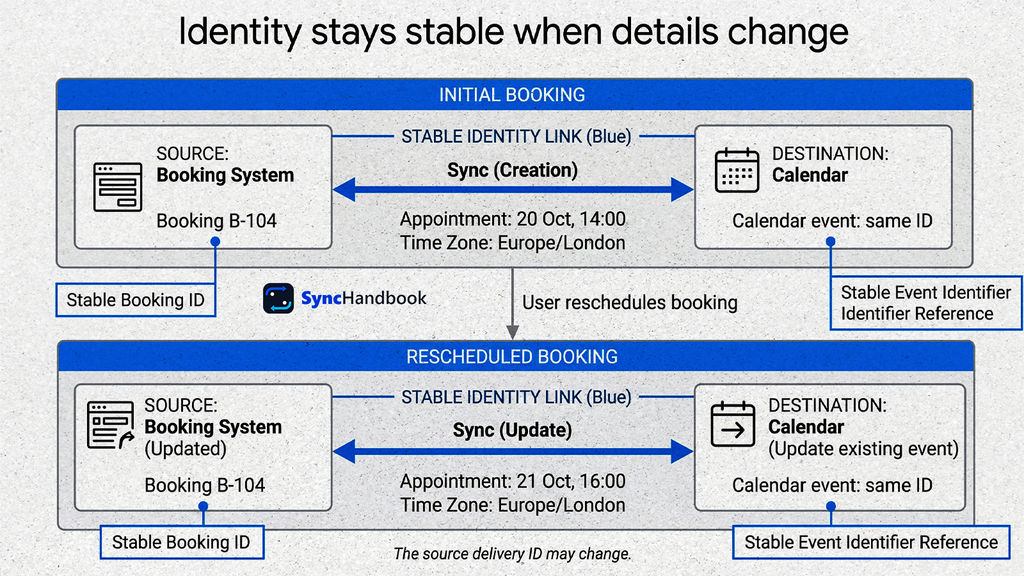
The durable approach is to give each booking a stable identity, preserve that identity when its details change, and inspect the existing calendar state before deciding whether to create, update, cancel, or do nothing.
This guide builds a one-way booking sync into an internal Google Calendar. It covers repeated deliveries, rescheduling, cancellation, time zones, conflicting edits, recovery, and cleanup of existing duplicates. You will use Make’s Google Calendar API-call module for the event ID, metadata, and conditional headers needed by the design.
The examples describe a configuration to implement and test, not a pretested downloadable Make blueprint. Start with a dedicated test calendar and dummy bookings. The acceptance tests near the end define what a working implementation should demonstrate.
Table of contents
- Diagnose Google Calendar duplicate events before changing the workflow
- The design: one booking, one calendar identity
- Step 1: define ownership and the source contract
- Step 2: fix the calendar and serialize this writer
- Step 3: refresh the booking and construct its stable event ID
- Step 4: find the existing event by private metadata
- Step 5: separate creation, updates, cancellation, and review
- Step 6: create the event with its identity attached
- Step 7: reschedule by patching the same event
- Step 8: apply cancellations without creating replacements
- Step 9: recover uncertain writes and API errors
- Step 10: test duplicate prevention and the complete lifecycle
- Time zones, daylight saving, and all-day bookings
- Remove existing duplicates without deleting legitimate meetings
- Operate the sync without creating a loop
- Frequently asked questions
Diagnose Google Calendar duplicate events before changing the workflow
Two visible calendar blocks are not enough to establish a duplicate. The same meeting can be visible through multiple selected calendars, or you might be seeing two legitimate appointments with similar names.
Temporarily display only the destination calendar. Open the suspected entries and inspect their calendar, organizer, time, and source reference. For integration troubleshooting, compare their actual Calendar event IDs.
| Observation | Likely investigation |
|---|---|
| One booking corresponds to two different events in the same destination calendar | Inspect repeated creation calls and competing integrations. |
| The overlap disappears when another calendar is hidden | Investigate calendar display or subscription overlap. |
| Two different bookings share a title and start time | Verify the source records before removing anything. |
| Both the old and new appointment time remain after a reschedule | The workflow may be creating instead of updating. |
| The extra event appears immediately after a failed execution is retried | Inspect whether the first request actually succeeded. |
Review your Make scenario history around one affected booking. Record which module performed the write, how many bundles reached it, and whether another scenario or the booking tool’s native Google Calendar integration also created an event.
For example, a booking application’s built-in calendar integration and your Make scenario can both be functioning correctly while jointly producing unwanted copies. Choose one writer for the destination before changing the scenario’s filters.
The design: one booking, one calendar identity
The workflow uses three separate identifiers:
| Identifier | Purpose | Changes on reschedule? |
|---|---|---|
| Source booking ID | Identifies the business appointment. | No, under this guide’s source contract. |
| Source delivery ID | Traces one notification or retry. | It can. |
| Google Calendar event ID | Identifies the destination resource. | No. |
A webhook delivery ID is unsuitable as the appointment identity because one booking can generate several notifications. A meeting title is unsuitable because it can change or repeat across customers.
Google supports supplying an event ID during creation specifically to help associate external records and avoid duplicate creation after an uncertain result. If omitted, Google generates the ID. Google’s event creation guide.
We combine a repeatable event ID with private metadata used for lookup. A calendar event stores its own source identity, so losing a separate success log does not automatically force another creation.
This is a practical duplicate-prevention design for one writer. It is not an exactly-once guarantee across every system. Keep the namespace under one scenario’s control and resolve unexpected collisions or multiple matches through review.
Step 1: define ownership and the source contract
Create a dedicated internal calendar such as Operations Bookings. This walkthrough creates ordinary, non-recurring, timed events without guests. It does not manage customer invitations, shared meeting-room resources, recurring series, or Google Meet provisioning.
Those boundaries keep the initial implementation focused: the booking system owns the appointment, and Calendar displays an operational copy. Staff should change appointment times in the source rather than treating both systems as equal authorities.
Require a source adapter to provide the following values:
| Field | Required meaning |
|---|---|
booking_id | Stable, nonempty identifier within one source account. |
status | Explicitly mapped to active or cancelled. |
summary | Human-readable appointment title. |
start_at | RFC 3339 timestamp with a UTC offset. |
end_at | RFC 3339 timestamp later than the start. |
time_zone | Approved IANA time-zone name, such as Europe/London. |
source_updated_at | Source modification time for investigation. |
A cancellation can omit start and end if the source no longer returns them; it must still provide a reliable identity and explicit cancellation state. Unknown states such as pending, deleted, or a failed source lookup must go to review until you define their meaning.
Use an authenticated source connector or your existing verified webhook entry point. Resolve the source account from trusted configuration. Do not let an incoming payload choose an arbitrary Google account or destination calendar.
If your booking provider replaces the booking ID on reschedule, adapt that behavior first. It may require cancelling the old booking and creating its replacement, or resolving a documented stable parent identifier. Never assume all providers preserve identity in the same way.
Step 2: fix the calendar and serialize this writer
Connect Google Calendar in Make with the intended Google account. Verify that this account can read full event details and modify events on the selected calendar. Make documents the connection and its available modules in the Google Calendar app reference.
Save the calendar’s actual ID in scenario configuration. Avoid relying on primary for a shared operational workflow: its meaning follows the authenticated account, so reconnecting a different account can change the destination.
Enable Sequential processing and Store incomplete executions in scenario settings. Sequential processing helps keep this scenario’s runs from overlapping; it does not coordinate another scenario, a script, or a separate integration. Make scenario settings.
Pause competing writers during the initial rollout. Also confirm that the calendar is not public if it contains internal booking information.
The source owns the event’s summary, start, end, and time-zone representation in this design. Other editable details are outside the routine patch. If a retrieved event has guests, recurrence, an unexpected event type, or an organizer that the connection cannot manage, hold it for review rather than applying the simple-event logic.
Use a separate test calendar ID. Merely adding the word “test” to an event title does not isolate a production write.
Step 3: refresh the booking and construct its stable event ID
Treat the incoming notification as a prompt to read the booking’s current state. Retrieve the record using the source’s native lookup module or authenticated API. This source-specific lookup is required: a workflow that only reuses an old notification body cannot reliably apply the latest reschedule or cancellation.
If retrieval fails, preserve the execution. Do not interpret a source 404 as cancellation unless that provider explicitly documents that behavior and your adapter implements it.
Add Tools > Set variable and name the variable identity_seed. Compose it from a fixed namespace and the unchanged booking ID:
syncbook:v1:booking_account_a:{booking_id}Replace {booking_id} with the actual source token. The namespace identifies this source account and integration purpose. Do not include the appointment date, event title, current timestamp, or source delivery ID.
Add another variable named event_id:
sha256(IDENTITY_SEED_TOKEN; "hex")Replace IDENTITY_SEED_TOKEN with the previous module’s output in Make’s expression editor. Make documents hexadecimal SHA-256 output in its text and binary functions.
The result is a 64-character lowercase hexadecimal string. Those characters fit Calendar’s permitted event-ID alphabet and length. Google also warns that collision detection during creation is not absolute in its distributed system; isolate the writer and investigate conflicts instead of claiming mathematical certainty about the full workflow. Event ID requirements.
Use the same seed on every replay. Preserve the booking ID exactly, including meaningful case. Freeze the namespace after launch, since changing it changes every derived identity.
Step 4: find the existing event by private metadata
Add Google Calendar > Make an API Call. Use the authorized connection to call the events collection with GET. The full HTTP reference is:
GET https://www.googleapis.com/calendar/v3/calendars/{calendarId}/eventsSet these query parameters using the module’s query fields:
| Parameter | Value |
|---|---|
privateExtendedProperty | sh_key= followed by the mapped event_id. |
showDeleted | true |
singleEvents | false |
maxResults | 2 |
Do not set q, timeMin, or timeMax. A rescheduled event could be outside a narrow date window, while a title search can match unrelated bookings.
Private extended properties belong to the event copy on the specified calendar, and the API can filter by their key-value pairs. This is why the fixed calendar ID is part of the design. Extended properties guide.
The full URLs in this guide are API references. If Make’s URL field expects a relative path, use the base URL shown by that module and enter only the remaining path. Encode the calendar ID as a path segment once; do not double-encode it or paste query parameters into several fields.
Keep the list response as one collection containing items. If the connector exposes a text body, use JSON > Parse JSON before mapping it. Avoid converting each event into a separate bundle at this stage, because the router must distinguish zero, one, and multiple matches.
Only interpret a successfully parsed calendar#events response as a lookup result. Confirm sufficient access, such as writer or owner. An API error is never an empty search.
Inspect nextPageToken too. Google can return fewer than the requested number of items even when more results remain. This workflow sends any response with a next-page token to review instead of making a write decision from a partial list. Events list reference.
Step 5: separate creation, updates, cancellation, and review
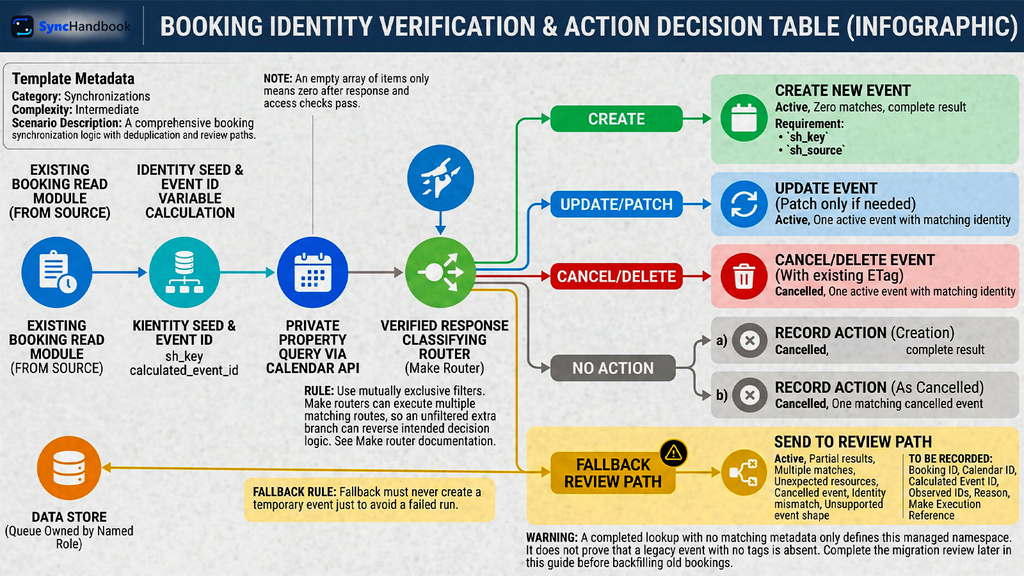
Add a Router after the validated list response. Derive the number of items from the returned array. An omitted items array can mean zero only after the response and access checks above pass.
First send partial results, multiple matches, and unexpected resources to a fallback review path. For one match, verify both its id and extendedProperties.private.sh_key against the calculated identity. Also require your expected sh_source marker, defined in the creation body below.
| Current source | Verified Calendar result | Action |
|---|---|---|
| Active | Zero matches, complete result | Create with the stable event ID. |
| Active | One active event with matching identity | Compare owned fields; patch only if needed. |
| Cancelled | One active event with matching identity | Delete that event using its current ETag. |
| Cancelled | Zero matches, complete result | Record no matching managed event; do not create. |
| Cancelled | One matching cancelled event | Record the cancellation as already reflected. |
| Active | A cancelled event, identity mismatch, or unsupported event shape | Hold for review. |
| Any | Multiple matches, pagination, or incomplete identity evidence | Hold for review. |
Use mutually exclusive filters. Make routers can execute more than one matching route, so an unfiltered extra branch can undo your intended decision logic. See Make’s router documentation.
The review path should save the booking ID, calendar ID, calculated event ID, observed IDs, reason, and Make execution reference. A Make data store can hold these items; give the queue a named owner. The fallback must never create a replacement event just to avoid a failed run.
A completed lookup with no metadata match only describes this managed namespace. It does not prove that a legacy event with no tags is absent. Complete the migration review later in this guide before backfilling old bookings.
Step 6: create the event with its identity attached
On the active-booking, zero-match route, use another Google Calendar API-call module:
POST https://www.googleapis.com/calendar/v3/calendars/{calendarId}/events
Content-Type: application/jsonUse JSON > Create JSON to build the body from mapped values. This avoids malformed JSON when a meeting title contains quotation marks or line breaks. The following example shows the intended structure:
{
  "id": "EVENT_ID_TOKEN",
  "summary": "Implementation planning",
  "start": {
    "dateTime": "2026-10-20T14:00:00+01:00",
    "timeZone": "Europe/London"
  },
  "end": {
    "dateTime": "2026-10-20T14:45:00+01:00",
    "timeZone": "Europe/London"
  },
  "extendedProperties": {
    "private": {
      "sh_key": "EVENT_ID_TOKEN",
      "sh_source": "booking_account_a_v1"
    }
  },
  "reminders": {
    "useDefault": false
  }
}Map the calculated hash into both id and sh_key; the literal EVENT_ID_TOKEN is not a valid production event ID. Map the current source title and validated times in place of the examples. Keep the source marker consistent with Step 5.
Do not supply iCalUID alongside id, and do not generate a fresh random ID for every retry. The insert operation accepts the event resource and returns the created event on success. Events insert reference.
There are no attendees in this baseline, and default reminders are disabled for the operational copy. Do not use this body as a customer invitation workflow without separately designing guest handling and notifications.
After success, check the returned ID and metadata. Save an audit outcome such as created, together with the booking ID, calendar ID, event ID, and execution time.
If this audit write fails after Google succeeds, recover the audit step or rerun discovery against the current source. Do not create another event with a new ID to compensate for a missing local receipt.
Step 7: reschedule by patching the same event
For one verified active event, compare the source-owned fields with the existing event. If the title, start, end, and intended time zone already match, record unchanged and stop that route.
Compare start and end as date-time values rather than raw strings. 13:00:00Z and 14:00:00+01:00 describe the same instant. Make provides date parsing and formatting functions for these comparisons. Preserve the source’s offset during parsing instead of interpreting it in an account default time zone. Make date and time functions.
If a change is needed, use PATCH on the matched event ID:
PATCH https://www.googleapis.com/calendar/v3/calendars/{calendarId}/events/{eventId}
Content-Type: application/json
If-Match: ETAG_FROM_THE_MATCHED_EVENTMap the event’s ETag, not the outer events-list ETag. Preserve the exact returned value, including its quotation marks. An ETag is a version token, not a date to reformat.
For a reschedule, send the owned fields with their desired values:
{
  "summary": "Implementation planning",
  "start": {
    "dateTime": "2026-10-21T16:00:00+01:00",
    "timeZone": "Europe/London"
  },
  "end": {
    "dateTime": "2026-10-21T16:45:00+01:00",
    "timeZone": "Europe/London"
  }
}The event ID and private identity markers remain unchanged. Google documents that unspecified fields remain untouched by PATCH, while supplied array fields replace their arrays. This design therefore omits attendees, attachments, and other arrays it does not own. PATCH also costs more quota units than a simple write; account for that when estimating high-volume usage. Events patch reference.
If-Match rejects the modification when the resource changed after you read it. On a 412, retrieve the current booking and calendar state again, then reconsider the change. Do not remove the header merely to force an outdated write through. Conditional resource modification.
This protects against intervening Calendar edits. It does not make the source lookup and Calendar write one atomic transaction. A newer source change can arrive while a run is in progress; subsequent processing and reconciliation must bring the copy up to date.
Step 8: apply cancellations without creating replacements
Only an explicit current source cancellation enters the cancellation route. For one verified active managed event, use:
DELETE https://www.googleapis.com/calendar/v3/calendars/{calendarId}/events/{eventId}
If-Match: ETAG_FROM_THE_MATCHED_EVENTDo not send a request body. A successful delete returns an empty body, so do not require an event object as proof of success. Record the successful HTTP outcome and the event ID. Events delete reference.
For an already-cancelled matching resource, record already_cancelled. For a complete zero-match lookup, record no_managed_match rather than claiming you deleted anything.
A later replay of an old active notification should refresh the source, discover the cancellation, and avoid creation. This depends on the source retaining reliable cancellation information. If deleted source records become indistinguishable from lookup failures, preserve an explicit cancellation record in your integration before adopting automatic cleanup.
If an active booking points to a Calendar event that someone manually deleted, stop for review. Do not assume deletion was accidental, change the event ID, and silently resurrect the appointment. Restoring a cancelled booking is a separate business decision.
Cancelled Calendar resources can have reduced metadata, so a cancellation trace may be insufficient to pass the ownership checks. Keep your audit history for investigation rather than relying on every deleted event retaining all private fields indefinitely.
Step 9: recover uncertain writes and API errors
Attach Retry error handlers to the Calendar API calls and outcome-store writes, initially setting Automatically complete execution to No for operator-reviewed recovery. Verify that Store incomplete executions is enabled. Make explains this setup in its Retry handler documentation.
Record the failed operation, status, structured error reason, calendar ID, event ID, and source booking ID. Treat a permission problem differently from an uncertain write result.
| Result | Recovery decision |
|---|---|
| Insert times out | Retrieve the exact calculated event ID before deciding whether to repeat creation. |
Insert returns 409 with reason duplicate | Inspect that ID; do not generate another ID for the same booking. |
Update or delete returns 412 | Refresh both systems and make a new decision with a fresh event ETag. |
A request returns 404 | Check the exact resource and calendar access; do not treat every 404 as permission to create. |
Delete returns 410 with reason deleted | Confirm the intended resource was already deleted and reconcile the audit result. |
| Rate-limit reason or transient backend failure | Apply bounded backoff and reevaluate before another write. |
These status meanings are documented in Google’s Calendar API error guide. Inspect the reason as well as the number: for example, not every 403 has the same cause.
For a timeout or duplicate-ID response, investigate with a read-only request:
GET https://www.googleapis.com/calendar/v3/calendars/{calendarId}/events/{eventId}If the event exists, verify ownership and compare it with the current source. If it is already correct, record the recovered outcome and discard the obsolete incomplete execution that would repeat the old write. If it needs updating, route the fresh state through the update process.
If it cannot be verified, keep the incident open. A cancelled event, missing metadata, or insufficient calendar access is not a reason to invent a replacement ID.
Recovery should start from the right point. A failed audit write can reuse confirmed Calendar output. A failed write with stale booking data needs a new source read. Repeatedly pressing retry on the same stored parameters can preserve the very mistake you are trying to fix.
For a related example of distinguishing confirmed delivery from uncertain results, see our Make failure-alert recovery guide.
Step 10: test duplicate prevention and the complete lifecycle
Run these tests in the isolated calendar. Use two different dummy bookings with the same title and time, so an accidental title-based deduplication rule is detectable.
| Test | Required observation |
|---|---|
| First active booking | One event is created with the calculated ID and identity properties. |
| Same booking delivered again | The existing event is found; no additional event is created. |
| Different delivery ID for the same booking | The destination event ID stays the same. |
| Another booking with the same title and time | A separate event exists because the booking identity differs. |
| Booking title changes | The original event is patched. |
| Booking time changes | The same event moves; the old slot does not retain another managed copy. |
| An old notification arrives after a reschedule | The source refresh supplies the current appointment details. |
| Explicit cancellation | The matching managed event is deleted or recognized as already cancelled. |
| Old active notification arrives after cancellation | The source refresh prevents recreation. |
| Create succeeds but the audit write fails | Recovery finds the existing event. |
| Calendar changes between lookup and PATCH | The stale ETag produces a conflict that remains reviewable. |
| Lookup returns multiple matches or a next-page token | No automatic mutation occurs. |
| Wrong account or inaccessible calendar | Execution fails visibly; no alternative calendar is used. |
| Missing booking identity or ambiguous date | Validation prevents a Calendar write. |
Also inspect the source markers and each branch’s audit outcome. A green scenario indicator alone does not prove that one correct appointment exists.
Simulate ambiguous outcomes through a controlled test or by pausing after the remote write. Do not create production network failures just to satisfy a checklist. Record which cases you actually exercised and which remain untested.
During the first production week, review incomplete executions and reconcile upcoming source bookings against the managed calendar daily. Adjust the frequency only after you know the real failure and booking volume.
Time zones, daylight saving, and all-day bookings
A correctly deduplicated event can still be wrong by an hour. Validate time handling separately from identity.
Require offset-bearing timestamps for timed bookings. Keep the IANA zone when the appointment’s local zone matters. Do not append Z to an unconverted local time: that changes its meaning to UTC.
For example, under current Europe/London time-zone rules, 09:00 local on 23 October 2026 corresponds to 08:00 UTC, while 09:00 local on 26 October corresponds to 09:00 UTC. A fixed offset copied from the earlier date will be wrong after the transition.
If the source supplies a local time that occurs twice during an autumn clock change, require an explicit offset or the source’s documented disambiguation. Do not guess. Similarly, a local time skipped during the spring change needs correction before writing.
All-day events use date values instead of dateTime values, and the end is exclusive. A single-day appointment on 20 October is represented as:
{
  "start": {"date": "2026-10-20"},
  "end": {"date": "2026-10-21"}
}Calendar documents these event time fields in its event resource reference. Treat all-day support as a separate route with its own validation. Do not mix date and dateTime in one start or end object, and do not silently convert a timed booking into an all-day event.

Remove existing duplicates without deleting legitimate meetings
Fix the writer before cleanup. Otherwise, a repaired calendar can become duplicated again on the next source change.
Export or otherwise preserve the relevant calendar records and source mappings before removing confirmed copies. Review one booking at a time, comparing its source identity, organizer, calendar, guests, and current booking state.
Group by a reliable booking reference where one already exists. Titles and overlapping times can help find candidates, but they are not sufficient deletion criteria. Two consultants can have different appointments with identical labels.
For each confirmed duplicate group, choose the canonical event and record the IDs selected for removal. Guest-bearing events need particular care because deleting an organizer’s event can affect attendees; handle those through the existing invitation workflow rather than this internal-calendar recipe.
Do not stamp this guide’s metadata onto an old event while leaving a different event ID and then enable the strict identity check. The workflow deliberately rejects that mismatch.
For this initial implementation, either finish legacy bookings under the old workflow and apply the new namespace only to new bookings, or perform a controlled migration that replaces approved internal copies with the calculated IDs. If you need to preserve legacy event IDs, add an explicit booking-to-event mapping mechanism and adapt the lookup checks before launch.
After cleanup, replay one current booking through the new path and verify that the cleaned state stays stable. Keep the cleanup record so a later support investigation can distinguish intentional deletion from a new sync failure.
Operate the sync without creating a loop
The source owns this one-way sync. Do not add a Calendar “event updated” trigger that blindly writes every change back to the same booking system. Your own update could trigger another source notification and start a feedback loop.
If two-way editing becomes necessary, first define field ownership, origin markers, conflict rules, and deletion behavior. That is a larger synchronization design.
For this workflow, keep an audit record containing booking ID, calendar ID, event ID, source modification time, outcome, and last checked time. Store the last confirmed result, while retaining enough execution history to investigate earlier changes.
Assign someone to monitor review, conflict, and incomplete-execution outcomes. A queue that nobody reads is deferred data loss, not successful error handling.
Periodically take current bookings from the source and run them through the same validation and discovery path. This catches missed notifications. Follow the source API’s pagination and include cancellation history or your explicit cancellation records; checking only active bookings cannot discover every missing cancellation.
Do not rebuild all historical events as a routine reconciliation strategy. Limit the audit to an agreed operational window and investigate differences by stable identity.
If these bookings drive service delivery, connect the verified calendar result to your B2B client operations workflow only after the appointment state is confirmed. Do not let a queued review item masquerade as a successfully scheduled meeting.
Frequently asked questions
Can I prevent Google Calendar duplicate events with only a Make data store?
A data store can track successful work, but a record written after Calendar creation leaves a gap if the creation succeeds and the store write fails. A stable Calendar event ID and remote identity lookup make that gap recoverable. A record written before creation creates a different risk: it can mark an appointment as handled before it exists.
Why not search for the title and update the first result?
Titles are editable and nonunique. The first result can be another customer’s appointment. Use a stable booking identity and treat multiple verified matches as a conflict.
Is Google Calendar’s iCalUID the same as the event ID?
No. They serve different identification purposes. This guide uses the Calendar resource’s id for direct API operations, not an imported iCalendar identifier. See the event resource documentation.
Can I add attendees and Google Meet later?
Yes, but treat them as additional features with separate tests. Guest changes require an explicit notification policy; conference creation has its own request and lifecycle behavior. Do not assume that preventing duplicate event resources also prevents repeated emails or duplicate conference requests. Google’s event creation guide.
What if one booking needs two destination calendars?
Manage each calendar copy deliberately and track outcomes separately. One successful write does not prove that the other calendar is synchronized. The single-destination assumptions in this guide must be extended before using it as a multi-calendar workflow.
Does this support recurring appointments?
The walkthrough handles individual bookings. Recurring series, individual instances, and exceptions have different identities and update behavior. Use Google’s recurring-events guide before extending the design to a series.
This article was prepared using Google Calendar and Make documentation accessed on September 13, 2026. This is: not the date of a live scenario test.
References:
- Google Calendar event creation
- Google Calendar event resource
- Private extended properties
- List events
- Insert event
- Patch event
- Delete event
- Conditional modifications and ETags
- Calendar API errors
- Make Google Calendar app
- Make scenario settings
- Make text functions
- Make date functions
- Make router
- Make Retry error handler