

A seamless b2b client onboarding process is the foundation of long term customer success and retention. Once an account executive marks a deal as won, operations teams typically face a tedious manual checklist: spin up a private Slack or Teams channel, generate standardized folder structures in Google Drive, assemble client discovery documents, and ping internal delivery leads.
Manual provisioning introduces delays, inconsistent folder hierarchies, and human configuration errors.
This runbook details an enterprise-grade automation pattern using Make.com that triggers upon contract signing (HubSpot Closed-Won deals), instantly provisions client folders in Google Drive, creates a secure client channel in Slack, and updates your CRM records with provisioned resource URLs.
Table of Contents
Architectural Overview
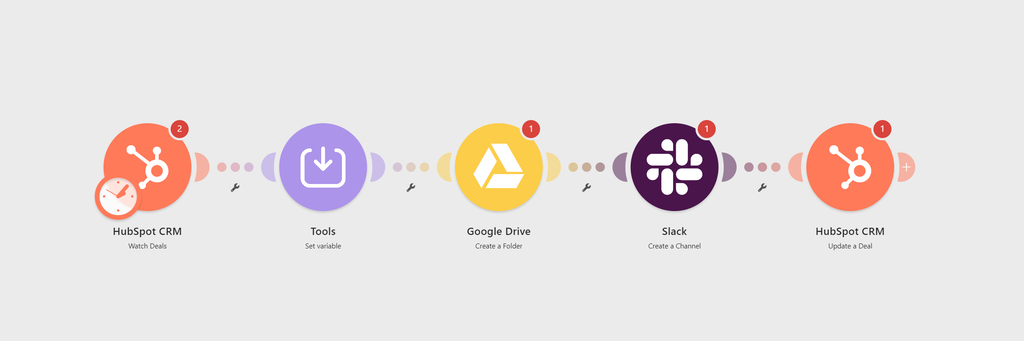
Here is the automated execution pipeline:
- Trigger: HubSpot CRM listens for deals transitioning to
Closed Won. - Directory Engine: Google Drive provisions a standardized root client directory with pre-built subdirectories (Contracts, Assets, Deliverables).
- Collaboration Layer: Slack creates a dedicated communication channel sanitized according to naming conventions.
- CRM Write-Back: HubSpot updates the underlying Deal object with the direct Google Drive URL and Slack channel link for instant team access.
Prerequisites
Ensure you have administrative credentials and API access configured for the following endpoints:
- Make.com: Core or Pro tier account with active webhook support.
- HubSpot CRM: Sales Hub access with permissions to read deals and custom properties.
- Google Workspace / Google Drive: Shared Drive access with folder creation privileges.
- Slack Workspace: App creation permissions or admin rights to create private/public channels.
Step 1: Ingest “Closed Won” Deals via Custom Webhooks
A common architectural mistake is using Make’s native “Watch Deals” polling module. Polling checks for updates every 15 minutes, which wastes operations and risks duplicate executions if a deal’s stage fluctuates.
To drastically reduce operation usage compared to 15-minute polling intervals and shift to an event-driven architecture, follow these steps:
- Create a Webhook in Make: Add a Webhooks > Custom Webhook module and copy the generated URL.
- Configure HubSpot Workflow: Inside HubSpot, create a Deal-based workflow triggered when
Deal Stageis exactlyClosed Won. - Send Webhook Payload: Add a “Send Webhook” action in HubSpot, pointing to your Make URL. Include essential properties like
Deal Name,Company ID, andDeal Owner.
Result: Your scenario now triggers instantly with zero operation waste, receiving a clean JSON payload directly from your CRM.
Step 2: String Sanitization for API Constraints
When passing CRM data to downstream tools like Slack and Google Drive, unhandled strings will cause critical API failures. The Slack API, for instance, strictly prohibits uppercase letters, spaces, special characters, and enforces a hard 80-character limit for channel names.
To prevent invalid_name_specials or name_too_long API errors, sanitize the inbound Deal Name using a Text Parser or Make’s built-in string functions.
Use this robust Make formula to format the text into a safe, URL-friendly string:client-{{substring(lower(replace(1.dealname; "/[^a-zA-Z0-9]/g"; "-")); 0; 73)}}
This operation converts all text to lowercase, replaces spaces/symbols with hyphens, and truncates the string right before the Slack API threshold.
Step 3: Provision Drive Workspaces via Template Cloning
Generating an empty root folder for a new client provides poor user experience. Enterprise onboarding requires immediate operational readiness.
Instead of just using “Create a Folder”, your architecture should clone a standardized Master Template:
- Maintain a Master Template: Keep a hidden Google Drive folder containing your standard subdirectories (e.g.,
/Contracts,/Deliverables,/Invoices) and boilerplate documents. - Copy the Structure: Use Make’s Google Drive modules (or an iteration sequence) to copy the template folder and rename the root directory using your sanitized Deal Name.
- Set Permissions: Use the Google Drive > Update a Share Link module to grant
ViewerorCommenteraccess to the client’s domain, and assignEditorrights to the internal Deal Owner retrieved from HubSpot.
Step 4: Create a Dedicated Slack Channel
Real-time collaboration requires isolating client discussions from general team chatter.
- Add a Slack module and select Create a Channel.
- Channel Type: Select
Private(for internal delivery teams) orPublic. - Channel Name: Set to
client-{{sanitized_client_name}}. - Add an immediate Slack > Invite to a Channel module to automatically bring the deal owner (
Deal Owner ID) and project delivery leads into the newly minted workspace. - Add a Slack > Post a Message step to drop an introductory message inside the new channel containing deal terms and the master Google Drive link.
Step 5: Update the HubSpot Deal with Asset Links
To close the loop, delivery teams must find their working files without digging through email threads or chat logs.
- Add a HubSpot CRM module and select Update a Deal.
- Deal ID: Map the ID from Step 1 (
1.id). - Map your custom deal properties:
Onboarding Slack Channel: Map the channel ID or name from Step 4.Client Drive Folder: Map theAlternate Linkfrom Step 3.Onboarding Status: Set value toWorkspace Provisioned.
Step 6: Automated Welcome Communications & SLA Tracking
Provisioning the backend infrastructure is only the first half of b2b client onboarding. The second half ensures the client feels welcomed and internal teams adhere to Service Level Agreements (SLAs).
Once the Google Drive workspace and Slack channels are provisioned, your Make scenario should route the generated asset URLs back into your CRM and trigger an automated welcome sequence.
- CRM Property Updates: Use the HubSpot > Update a Deal module to populate custom properties like
Workspace URLandSlack Channel Link. Changing the deal stage to “Onboarding Active” can simultaneously trigger an introductory email via your marketing automation tool. - Internal SLA Notifications: Send a formatted message to your internal Customer Success Slack channel, alerting the assigned Account Manager that the backend provisioning is complete. Include action buttons or direct links to the newly created assets to eliminate manual searching.
Handling Common Edge Cases
1. Naming Collisions in Slack
Slack limits channel names to 80 characters and rejects existing names. If a client renews or signs an upsell deal, a naive scenario will fail on duplicate channel creation.
- Solution: Insert a Slack > List Public Channels search filter before creation, or append the unique Deal ID to the end of the channel string (
client-acme-{{1.id}}).
2. Rate-Limiting on Subdirectory Generation
Rapidly firing multiple folder creation requests across Shared Drives can trigger Google Drive API 429 errors.
- Solution: Use a small Sleep module (500ms) between child folder creations or execute folder scaffolding via a pre-templated Google Drive copy operation.
Advanced Error Handling & Data Consistency
In an enterprise-grade Make scenario, relying on standard execution paths is risky. API rate limits, temporary outages, or malformed data can cause your b2b client onboarding workflow to fail silently, leaving the client in limbo.
To guarantee zero data loss, implement Make’s native error-handling directives:
- Break Directive: Attach a
Breakerror handler to your Google Drive and Slack modules. If the API rejects the request due to a rate limit (HTTP 429), the Break directive will store the incomplete execution and automatically retry it after a specified interval. - Fallback Notifications: If a critical module fails definitively, route the error to a fallback
Routerpath that sends an urgent direct message to your IT or RevOps team via Slack, containing theDeal IDand the specific error output.
For comprehensive guidelines on managing API failures and retry logic, refer to the official Make Error Handling Documentation.
Frequently Asked Questions (FAQ)
How do I handle multiple client contacts during b2b client onboarding?
Instead of adding a single contact to your Slack channel and Google Drive, use Make’s Iterator module. You can retrieve all associated contacts from the HubSpot Deal, pass them through the Iterator, and dynamically invite multiple stakeholders to the shared workspace without manual intervention.
What happens if the Slack API rate limits my scenario?
Enterprise b2b client onboarding workflows can trigger multiple API calls simultaneously. If Slack returns a 429 Too Many Requests error, Make.com will automatically pause and retry if you implement a Break directive in your error-handling route. This ensures no client is left without their communication channel.
Can this architecture work with CRMs other than HubSpot?
Absolutely. While this guide focuses on HubSpot, the core architecture is CRM-agnostic. You can replace the webhook trigger with native modules for Salesforce, ActiveCampaign, or Pipedrive. As long as the CRM can send a structured JSON payload upon a “Closed Won” event, the downstream Google Workspace and Slack provisioning will function identically.
Complete Post-Sale Architecture
Workspace provisioning handles the operational kick-off of a new contract. If your organization also handles recurring billing or manual invoices, link this provisioning flow to our previous runbook on how to auto-create QuickBooks Online invoices from HubSpot deals to maintain an automated bridge between sales, operations, and finance.
Conclusion: Scaling Your RevOps Infrastructure
Automating your b2b client onboarding process is more than just a technical upgrade; it is a strategic investment in customer experience and operational scalability. By replacing manual data entry with event-driven Webhooks in Make, sanitizing API inputs for Slack, and utilizing template cloning in Google Workspace, you eliminate human error and reduce onboarding time from days to seconds.
As your agency or SaaS business scales, this zero-touch provisioning architecture ensures that your RevOps team can handle increased deal volumes without ever compromising the quality of your service delivery. Stop managing administrative tasks, and start focusing on building lasting client relationships from day one.