

Manual offboarding in enterprise B2B SaaS is one of the most critical security liabilities in modern operations. Building a zero-trust SaaS offboarding workflow is critical when an employee leaves the company. When an enterprise contract expires or churns, access to proprietary repositories, shared Google Drive environments, Slack Connect channels, and operational dashboards often remains open for weeks. Under SOC2 Trust Services Criteria (CC6.1, CC6.3) and ISO 27001 (A.9.2.6), failure to revoke external and internal access deterministically within a documented SLA constitutes a non-conformity.
This runbook establishes an automated, idempotent offboarding engine using Make. The pipeline listens for contract termination events, revokes multi-tenant permissions across Google Workspace and Slack, updates CRM lifecycle stages, and commits an immutable, cryptographic audit trail to long-term storage.
Table of Contents
Architecture Overview & System Boundaries
The offboarding pipeline functions as a transactional state machine. Every execution checks for idempotency, isolates failures using non-blocking error directives, and records every API response into an append-only audit log.
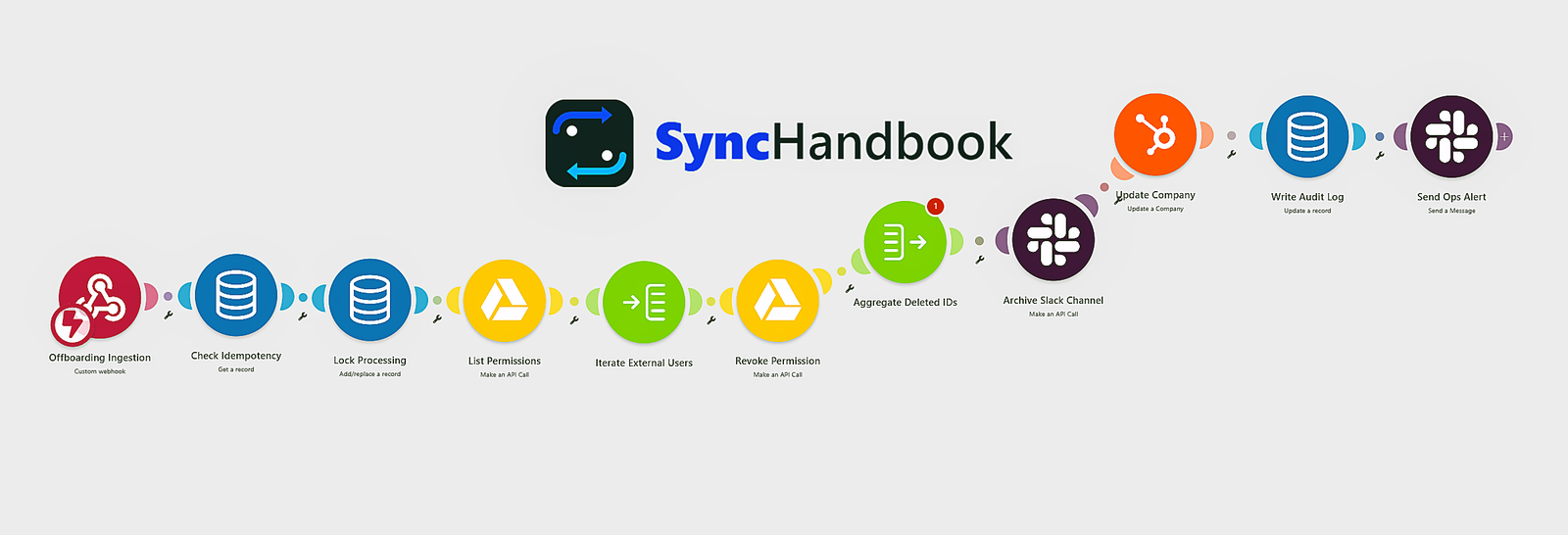
[Contract Termination: HubSpot Deal "Closed Lost" / Stripe Subscription "Canceled"]
                                │
                                ▼
         [Custom Webhook Trigger with HMAC-SHA256 Auth]
                                │
                                ▼
         [Idempotency Check: Make Data Store / Redis]
             ├── If already processed ──► [200 OK Early Exit]
             └── If unparsed ───────────► [Lock Record (status: "in_progress")]
                                │
                                ▼
             [Iterator: Service Deprovisioning Split]
              ├── 1. Google Drive: Recursive Permission Revocation (API v3)
              │       └── Error Directive: Resume (Catch 404 / 403 orphaned files)
              ├── 2. Slack Connect: User Eviction & Channel Archival
              │       └── Error Directive: Commit (Catch `already_archived`)
              ├── 3. HubSpot: Lifecycle State Machine Mutation ("Churned Customer")
              │       └── Error Directive: Rollback / Retry
              └── 4. Audit Engine: Hash Generation & Immutable Log Emission
                                │
                                ▼
               [Slack Alert to #security-revops-audits]
This workflow directly complements our companion runbook, How to Automate B2B Client Onboarding and Workspace Provisioning Using Make. Where onboarding establishes shared workspaces and role-based permissions, this architecture guarantees their programmatic cleanup. For contracts terminated due to involuntary churn or billing failures, review our SaaS Dunning and Failed Payment Recovery Workflows before triggering immediate access revocation.
Step 1: SaaS Offboarding Webhook Ingestion & Token Validation
The workflow triggers via a secure HTTPS webhook emitted by your CRM (HubSpot Workflow Webhook Action) or billing engine when a contract terminates.
Ingestion Contract (JSON Payload)
{
  "event_id": "evt_offboard_99281a8b",
  "event_type": "contract.terminated",
  "timestamp": "2026-09-11T18:45:00Z",
  "data": {
    "account_id": "acc_enterprise_4412",
    "company_name": "Acme Global Industries",
    "hubspot_company_id": "90218412",
    "termination_reason": "voluntary_churn",
    "contract_end_date": "2026-09-11",
    "resources": {
      "shared_drive_id": "0AJk20394850Z19AA",
      "folder_id": "1A2b3C4d5E6f7G8h9I0J",
      "slack_channel_id": "C06XYZ89012"
    },
    "client_stakeholders": [
      {
        "email": "sarah.connor@acmeglobal.com",
        "role": "workspace_admin"
      },
      {
        "email": "john.reese@acmeglobal.com",
        "role": "billing_admin"
      }
    ]
  },
  "signature": "e4d909c290d0fb1ca068ffaddf22cbd0add8abfc1a77ec4c412d4094130549f2"
}Webhook Verification & Filter Expression
Do not process payloads without validating authenticity. Use Make’s native Tools > Set Variable module to verify the incoming signature against the raw body before downstream execution:
sha256(concatenate({{1.body}}; "YOUR_SHARED_WEBHOOK_SECRET")) == {{1.headers.x-hubspot-signature-v3}}
Step 2: IdP Directory Graceful Deprovisioning & Google Data Transfer
A critical architectural flaw in automated offboarding workflows is setting a Google Workspace user account to suspended: true immediately upon webhook receipt.
Suspending an account revokes its internal directory permissions and OAuth grants. When downstream asynchronous processes, specifically the Google Data Transfer API, attempt to reassign Drive documents and Calendar events to a manager, Google rejects the transfer request with an unrecoverable 403 Forbidden: User account is suspended or 412 Precondition Failed error. This creates orphaned files and permanent data loss.
To maintain zero trust security without corrupting organizational assets, implement a four stage graceful degradation sequence inside Make:
1. Terminate Active OAuth & Browser Sessions
Before altering account attributes, immediately invalidate every active web session, mobile token, and native client connection.
In Make, add an HTTP > Make a Request module configured with your Google Workspace Admin SDK OAuth2 credentials:
- Method:
POST - URL:
[https://admin.googleapis.com/admin/directory/v1/users/](https://admin.googleapis.com/admin/directory/v1/users/){{1.user_email}}/signOut
Result: The user is instantaneously ejected from Gmail and Google Drive on all devices.
2. Credential Scrambling & MFA Invalidation
Because the account must remain active while files transfer, prevent new authentication requests by scrambling the password to a cryptographically secure random string:
- Method:
PUT - URL:
[https://admin.googleapis.com/admin/directory/v1/users/](https://admin.googleapis.com/admin/directory/v1/users/){{1.user_email}} - Request Body (JSON):
{
  "password": "{{randomString(32; "alphanumeric", "!@#$%^&*()")}}",
  "changePasswordAtNextLogin": true,
  "suspended": false
}3. Trigger Data Transfer API for Drive & Calendar Assets
With the user locked out but the account active, transfer ownership of all cloud assets to their designated reporting manager.
- Method:
POST - URL:
[https://admin.googleapis.com/admin/datatransfer/v1/transfers](https://admin.googleapis.com/admin/datatransfer/v1/transfers) - Request Body (JSON):
{
  "oldOwnerUserId": "{{1.user_google_id}}",
  "newOwnerUserId": "{{1.manager_google_id}}",
  "applicationDataTransfers": [
    {
      "applicationId": "455439601446",
      "applicationTransferParams": [{"key": "PRIVACY_LEVEL", "value": ["SHARED", "PRIVATE"]}]
    },
    {
      "applicationId": "735451630157",
      "applicationTransferParams": [{"key": "RELEASE_RESOURCES", "value": ["TRUE"]}]
    }
  ]
}4. Tombstone State & License Downsizing
Once the Data Transfer API returns a 200 OK (with status IN_PROGRESS), finalize the account lifecycle:
- Move to Quarantined OU & Suspend: Update the user record via
PATCHwith{"suspended": true, "orgUnitPath": "/Deprovisioned_Employees"}. - License Recovery: Reassign the seat to an Archived User (AU) SKU to release expensive Google Workspace Enterprise licenses back to your available SaaS subscription pool.
| Field Name | Type | Description |
key | Text (Required) | The incoming event_id (e.g., evt_offboard_99281a8b). |
account_id | Text | The unique enterprise account identifier. |
status | Text | State machine status: PROCESSING, COMPLETED, FAILED. |
initiated_at | Date | Timestamp of first execution attempt. |
completed_at | Date | Timestamp of final audit log generation. |
Module Configuration: Get & Lock Record
- Add a Data Store > Get a Record module. Set
Keyto{{1.event_id}}. - Attach a Filter immediately after:
- Condition:
Record: key DOES NOT EXISTORRecord: status EQUAL TO "FAILED" - If the record exists and
status == "COMPLETED", the filter terminates the execution path immediately with a status 200 equivalent.
- Condition:
- Add a Data Store > Add/Replace a Record module:
Key:{{1.event_id}}status:PROCESSINGinitiated_at:{{formatDate(now; "YYYY-MM-DDTHH:mm:ssZ")}}
3. Google Workspace / Drive Permission Revocation
Revoking client access requires removing permissions from both top-level shared folders and nested assets. While deleting the top-level parent folder permission cascades to children in Google Drive, direct file shares (e.g., links generated via “Share with specific people”) will linger unless cleaned explicitly.
Module 3A: Google Drive API (List All Permissions)
Use the Google Drive > Make an API Call module to retrieve the live permissions table for the designated resource:
- URL:
/v3/files/{{1.data.resources.folder_id}}/permissions - Method:
GET - Query String:
fields:permissions(id, role, type, emailAddress)supportsAllDrives:true
Module 3B: Iterator & Targeted Revocation Filter
Pass the array {{3A.body.permissions}} into an Iterator module.
Attach a filter between the Iterator and the deletion module to prevent your own internal teams or service accounts from being revoked:
- Filter Rule:
emailAddress DOES NOT CONTAIN "@yourcompany.com"ANDrole != "owner"
Module 3C: Permission Deletion
Add another Google Drive > Make an API Call module:
- URL:
/v3/files/{{1.data.resources.folder_id}}/permissions/{{Iterator.id}} - Method:
DELETE - Query String:
supportsAllDrives:true
                               ┌────────────────────────────────────────┐
                               │  Google Drive: Delete Permission       │
 [Iterator: Permissions] ─────►│  DELETE /v3/files/{id}/permissions/{id}│
                               └──────────────────┬─────────────────────┘
                                                  │ (On 404 / 403 Error)
                                                  ▼
                                      ┌───────────────────────┐
                                      │ Error Directive:      │
                                      │ Resume (Ignore Error) │
                                      └───────────────────────┘
Error Handling Pattern: Attach an Error handler route to Module 3C. Select the Resume directive. If an external collaborator has already removed their account, the Drive API returns
404 Not Found. UsingResumeguarantees that this expected edge case does not halt the rest of the deprovisioning sequence.
4. Slack Connect Channel Teardown & Archival
Enterprise accounts typically communicate through private Slack Connect channels. The offboarding flow must evict external accounts and archive the channel to free up shared seat limits and preserve a immutable history.
Module 4A: Evict External Guest Users
Use the Slack > Make an API Call module to remove each external collaborator:
- URL:
[https://slack.com/api/conversations.kick](https://slack.com/api/conversations.kick) - Method:
POST - Headers:
Authorization:Bearer {{slack_user_token}}Content-Type:application/x-www-form-urlencoded
- Body:
channel:{{1.data.resources.slack_channel_id}}user:{{Iterator.slack_user_id}}
(Note: The Slack Bot Token must have groups:write, channels:manage, or admin.conversations:write scopes).
Module 4B: Channel Archival
Once external users are removed, archive the channel:
- URL:
[https://slack.com/api/conversations.archive](https://slack.com/api/conversations.archive) - Method:
POST - Body (JSON):
{
  "channel": "{{1.data.resources.slack_channel_id}}"
}Error Handling Pattern: Attach an Error handler route with the Commit directive. If the channel is already archived (
error: already_archived), Slack returns an HTTP 200 with an error object or an HTTP 400. Directing toCommittreats this as an acceptable state and continues execution.
5. CRM Lifecycle Transition (HubSpot / Salesforce)
The CRM must update immediately so sales and customer success teams see that operational access has been decommissioned.
Module 5: HubSpot – Update Company Record
Add a HubSpot CRM > Update a Record module:
- Object Type:
Companies - Record ID:
{{1.data.hubspot_company_id}} - Properties to update:
lifecyclestage:customer_churnedoffboarding_completed_date:{{formatDate(now; "YYYY-MM-DD")}}active_service_entitlements:NONEsecurity_deprovisioning_notes:Automated deprovisioning completed via SyncHandbook RevOps Engine. Permissions revoked from Drive and Slack.
6. Immutable SOC2 / ISO27001 Audit Trail Generation
Auditors require verifiable proof that access was revoked according to contract SLAs. To create an immutable, tamper-evident log, the system computes a SHA-256 digest of the deprovisioning payload and writes the result to cold storage (such as AWS S3 Object Lock, Supabase, or Google BigQuery).
Audit Payload Schema
{
  "audit_version": "2026-09-01",
  "audit_id": "aud_decom_894129841",
  "event_ref": "{{1.event_id}}",
  "account_id": "{{1.data.account_id}}",
  "company_name": "{{1.data.company_name}}",
  "actions_performed": [
    {
      "system": "google_drive",
      "resource_id": "{{1.data.resources.folder_id}}",
      "action": "REVOKE_PERMISSIONS",
      "status": "SUCCESS",
      "revoked_entities": ["sarah.connor@acmeglobal.com", "john.reese@acmeglobal.com"]
    },
    {
      "system": "slack_connect",
      "resource_id": "{{1.data.resources.slack_channel_id}}",
      "action": "KICK_USERS_AND_ARCHIVE",
      "status": "SUCCESS"
    },
    {
      "system": "hubspot_crm",
      "resource_id": "{{1.data.hubspot_company_id}}",
      "action": "MUTATE_LIFECYCLE_STAGE",
      "status": "SUCCESS",
      "new_stage": "customer_churned"
    }
  ],
  "execution_metrics": {
    "started_at": "{{2.initiated_at}}",
    "completed_at": "{{formatDate(now; "YYYY-MM-DDTHH:mm:ssZ")}}",
    "duration_ms": 1420
  },
  "compliance_signature": "{{sha256(concatenate(1.event_id; 1.data.account_id; now))}}"
}Module 6: PostgreSQL / BigQuery / S3 Upload
Send this document via an HTTP or native storage connector:
- Table / Bucket:
production_revops_audit_logs - Partition Key:
{{formatDate(now; "YYYY-MM")}} - Retention Policy:
730 Days (Immutable)
7. State Store Finalization & Incident Alerting
Once audit logs are safely committed, close out the idempotency transaction and notify the security engineering team.
- Data Store > Update a Record:
- Key:
{{1.event_id}} - status:
COMPLETED - completed_at:
{{formatDate(now; "YYYY-MM-DDTHH:mm:ssZ")}}
- Key:
- Slack > Create a Message:
- Channel:
#revops-security-alerts - Message Formatting:
- Channel:
:lock: B2B Client Offboarding Completed
Account:{{1.data.company_name}}({{1.data.account_id}})
Audit Signature:{{6.compliance_signature}}
Resources Revoked:
- Google Shared Folder:
{{1.data.resources.folder_id}}(Permissions Purged) - Slack Connect:
{{1.data.resources.slack_channel_id}}(Archived) - CRM Status:
customer_churned
Failure Modes & Error Recovery Matrix
When designing mission-critical RevOps workflows, unhandled exceptions can break state parity across SaaS platforms. Build your error handlers around this reference matrix:
| Failure Mode | Upstream Code | Immediate Impact | Make Error Directive | Resolution Procedure |
| Orphaned Drive User | HTTP 404 | User was already deleted from domain or folder. | Resume | Ignore error; log USER_NOT_FOUND in audit record and continue. |
| Slack Archive Collision | HTTP 400 (already_archived) | Admin manually archived channel before run. | Commit | Mark Slack step as success in local memory and proceed to CRM step. |
| HubSpot API Rate Limit | HTTP 429 (Secondary Rate Limit) | CRM stage transition rejected. | Break (Retry 3x) | Set exponential backoff: 3 intervals (1 min, 5 min, 15 min). |
| Idempotency Lock Hang | N/A | Scenario timed out mid-execution. | DLQ / Alert | Write payload to Dead Letter Queue, flag status as FAILED, alert on-call engineer. |
Sandbox Verification & Test Payload
Run this integration test against your Make staging webhook using cURL. Replace the target URL and auth headers with your development endpoints:
curl -X POST https://hook.eu1.make.com/YOUR_SANDBOX_OFFBOARDING_HOOK \
  -H "Content-Type: application/json" \
  -H "x-hubspot-signature-v3: test_signature_bypass" \
  -d '{
    "event_id": "evt_test_offboard_001",
    "event_type": "contract.terminated",
    "timestamp": "2026-09-11T12:00:00Z",
    "data": {
      "account_id": "acc_staging_test_99",
      "company_name": "Staging Verification Corp",
      "hubspot_company_id": "11223344",
      "termination_reason": "sandbox_verification",
      "resources": {
        "shared_drive_id": "0AJk00000000000001",
        "folder_id": "1A2B3C4D_STAGING_TEST",
        "slack_channel_id": "C_STAGING_TEST"
      },
      "client_stakeholders": [
        {
          "email": "sandbox.user@synchandbook-test.com",
          "role": "workspace_admin"
        }
      ]
    }
}'Verification Checklist
- [ ] Verify that Make processes the payload with status code 200.
- [ ] Resend the exact same cURL request immediately. Confirm that the Idempotency Check filter stops execution at Module 2, producing no duplicate Slack or Google Drive API calls.
- [ ] Query the audit destination table to confirm the SHA-256 checksum and ISO-8601 timestamps match the test execution.
Before you can securely offboard clients, you need a deterministic provisioning process. If you haven't automated your initial client setup yet, follow our companion runbook: How to Automate B2B Client Onboarding and Workspace Provisioning Using Make to build the complementary onboarding pipeline.
By implementing this saas offboarding workflow, your RevOps team can eliminate manual errors and secure company data instantly.