

Building a reliable lead enrichment and automated routing pipeline is essential for modern RevOps teams looking to eliminate manual CRM triage. Speed-to-lead is the single most decisive metric in enterprise B2B sales. Research consistently demonstrates that responding to an inbound enterprise lead within five minutes yields an 8x higher qualification rate than waiting thirty minutes.
Yet, most modern growth organizations still rely on brittle manual handoffs: marketing webhooks dump raw form submissions into a generic CRM bucket, an operations manager manually qualifies the lead, consults a spreadsheet to see whose turn it is to take a call, and reassigns the record in HubSpot.
By the time the sales development representative (SDR) reaches out, the buyer has already booked a demo with a competitor.
This technical runbook details how to architect a production-grade, serverless Lead Enrichment and Dynamic Round-Robin Routing Engine using Make.com, HubSpot CRM, and Make Data Stores.
Table of Contents
Technical Architecture & Pipeline Metrics
| Specification | Metric / Technology | Operational Standard |
|---|---|---|
| Ingestion Pipeline | Webhook / API Intake | Sub-second execution (< 800ms) |
| State Storage | Make Data Store (Key-Value) | ACID-compliant transactional counter |
| Routing Algorithm | Modulo Arithmetic Round-Robin | Fair distribution across active SDR pools |
| Enrichment Tier | Clearbit / Apollo / Abstract API | Real-time domain verification & firmographics |
| Downstream CRM | HubSpot Sales Hub | Direct Owner ID assignment & Deal creation |
| Alerting Layer | Slack Bot API | Rich blocks with one-click CRM deep links |
Architectural Flow Diagram
[Custom Webhook: Inbound Lead Intake]
             │
             ▼
[Tools: Extract Domain & Filter Disposable Emails]
             │
             ▼
[HTTP: Query Firmographic Enrichment API]
             │
             ▼
[Router: Tier Qualification Engine]
     ├─── Route A: Enterprise Tier (ARR > $50M or Employees > 250)
     │         │
     │         ▼
     │    [Data Store: Fetch & Increment Enterprise SDR Index]
     │         │
     │         ▼
     │    [HubSpot: Upsert Contact & Assign Enterprise SDR]
     │         │
     │         ▼
     │    [Slack: Dispatch Urgent High-Priority Alert]
     │
     └─── Route B: Mid-Market Tier (Standard Routing)
               │
               ▼
          [Data Store: Fetch & Increment Mid-Market SDR Index]
               │
               ▼
          [HubSpot: Upsert Contact & Assign Mid-Market SDR]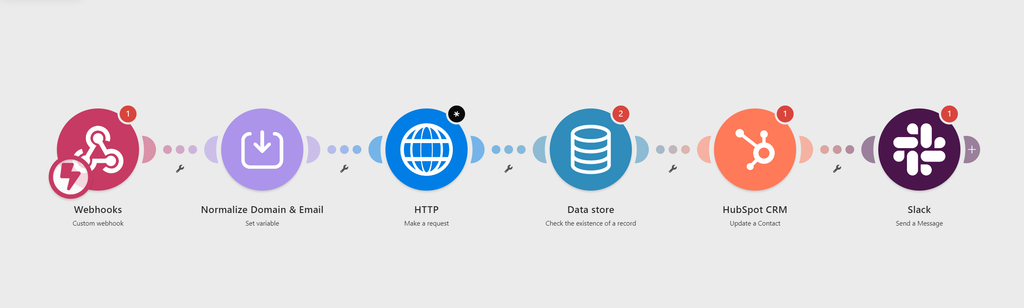
Prerequisites & Data Contract
To deploy this scenario, ensure your environment satisfies the following configurations:
- Make.com: Core or Pro plan (Data Stores enabled).
- HubSpot CRM: API access with
crm.objects.contacts.writeandcrm.objects.deals.writescopes. - Data Store Structure: A dedicated data store named
SDR_Routing_Statewith two key records:- Key:
enterprise_index(Type: Number, Initial Value:1) - Key:
midmarket_index(Type: Number, Initial Value:1)
- Key:
Inbound Ingestion Contract (JSON Payload)
Configure your intake forms (Webflow, Typeform, Chili Piper, or custom React frontend) to dispatch payloads matching this schema:
{
  "submission_id": "sub_98432a10",
  "first_name": "Jordan",
  "last_name": "Miller",
  "work_email": "jordan.miller@cloudscale.io",
  "company_name": "CloudScale Systems",
  "company_domain": "cloudscale.io",
  "annual_revenue": "$20M - $50M",
  "use_case_notes": "Evaluating workflow automation for our 400-person support division.",
  "timestamp": "2026-09-12T08:30:00Z"
}
}Step 1: Webhook Ingestion & Domain Normalization
Raw email inputs frequently introduce formatting inconsistencies (spaces, trailing punctuation, or capitalization).
- Add a Custom Webhook module in Make named
Inbound B2B Lead Webhook. - Attach a Tools > Set Variable module to sanitize the input and extract the corporate domain:
- Variable Name:
clean_domain - Variable Value: Use Make’s text manipulation functions to isolate the domain part of the email:
- Variable Name:
lower(get(split(1.work_email; "@"); 2)) 3.Set a second variable clean_email:
trim(lower(1.work_email))Step 2: Domain Screening & Automated Lead Enrichment
Submitting raw inbound email addresses directly to an enrichment API (e.g., Clearbit, Apollo, or ZoomInfo) without domain validation leads to two costly failure modes:
- API Credit Waste: Paid enrichment tokens are burned attempting to enrich freemail domains like
gmail.comoryahoo.com. - CRM Data Corruption: Querying a corporate enrichment endpoint with
alex@gmail.comcauses the provider to return Google LLC corporate headquarters data (100,000+ employees, Mountain View CA), overwriting actual lead account data in HubSpot.
To prevent this, place a Make.com Router immediately after the inbound webhook to separate corporate domains from free or disposable webmail.
1. Domain Extraction & Normalization
Inside a Tools > Set Variable module, extract the root domain from the submitted email address using Make’s string parser:
Variable Name:
lead_domain

Variable Value:
{{lower(last(split(1.work_email; "@")))}}
2. Configure the Router Filter Gates
Create two execution paths downstream of the router:
Route A: Corporate Leads (Proceed to Enrichment)
Set the filter condition on Route A to exclude known consumer and temporary email providers using a case-insensitive regular expression:
- Condition:
{{lead_domain}} - Operator:
Does not match regex - Pattern:
^(gmail|yahoo|hotmail|outlook|live|icloud|me|proton|protonmail|aol|zoho|tempmail|guerrillamail|mailinator)\.[a-z.]{2,}$
Only leads passing this gate trigger the HTTP > Make an API Key Request module (or native Apollo/Clearbit module) to enrich company size, industry, tech stack, and annual revenue.
Route B: Free / Disposable Leads (Bypass Enrichment)
Set Route B as the fallback path (or invert the regex above). Leads taking this path bypass paid API calls entirely:
- Default
company_nameto"Independent / Unassigned" - Default
employee_countto"Unknown" - Route directly to HubSpot contact creation and assign a lower lead priority score for SDR triage.
3. Enrichment API Payload with Safe Fallbacks
For Route A, query your enrichment provider using the parsed domain. If querying an endpoint directly via HTTP module, ensure proper error handling so missing company records (HTTP 404) do not halt scenario execution:
{
  "domain": "{{lead_domain}}",
  "webhook_url": "{{env.ENRICHMENT_CALLBACK_URL}}",
  "enrich_technographics": true
}Production Directive on Missing Attributes:
Always wrap downstream HubSpot property mappings in {{ifempty()}} formulas. If an enrichment provider matches a domain but lacks specific firmographic attributes, this prevents Make from passing null or empty strings that could wipe existing CRM properties:
HubSpot Property: Number of Employees
Value: {{ifempty(2.body.company.metrics.employees; "Unknown")}}

HubSpot Property: Industry
Value: {{ifempty(2.body.company.category.industry; "Technology")}}Step 3: Configure the Modulo Round-Robin Engine
To distribute qualified leads evenly across sales representatives without external round-robin tools, use an atomic counter stored in a Make Data Store paired with modulo arithmetic.
1. State Persistence via Make Data Store
Inbound webhooks execute statelessly in parallel. To maintain a unified counter across separate scenario runs:
- Add a Data store > Increment a variable module.
- Select your internal data store (e.g.,
RevOps_State_Store). - Set Key to
global_lead_counter. - Set Increment value to
1. - This module returns an updated integer (e.g.,
{{3.value}}) on every inbound execution.
2. The 1-Indexed Modulo Formula
Standard programming modulo arithmetic (counter % N) outputs an index from 0 to N-1. However, Make.com array indices are 1-based, not 0-based. If a modulo formula returns 0, querying get(reps; 0) yields null, leaving the lead unassigned.
To generate clean cyclical values (1, 2, 3) across $N = 3$ representatives, use an offset modulo calculation in a Tools > Set Variable module:
Variable Name:
assigned_rep_index

Variable Value:
{{mod(3.value - 1; 3) + 1}}
How the index cycles:
- Lead #1:
mod(1 - 1; 3) + 1=0 + 1= 1 - Lead #2:
mod(2 - 1; 3) + 1=1 + 1= 2 - Lead #3:
mod(3 - 1; 3) + 1=2 + 1= 3 - Lead #4:
mod(4 - 1; 3) + 1=0 + 1= 1
3. Resolving Representative Metadata
Map the resulting index to an array of your sales team’s HubSpot Owner IDs and Slack Member IDs.
Create a static array inside a Tools > Set Multiple Variables module or configure a simple switch() formula inside the downstream HubSpot module:
{{switch(
  assigned_rep_index;
  1; "58920194";
  2; "61049281";
  3; "74920482";
  "58920194"
)}}
(Note: Replace the numeric strings above with your team’s production HubSpot Owner IDs. The final value acts as a safe fallback default).signments, survives scenario restarts, and ensures balanced lead volume across reps.
Step 4: Multipart Record Creation and Object Association
Once the lead is enriched and the owner index resolved, execute atomic record creation in HubSpot using native API v3 associations.
1. HubSpot > Create a Company (Find or Create)
Prevent duplicate accounts by running a lookup before creation:
- Search Property:
domainequals{{lead_domain}} - If Not Found: Create Company with properties:
- Name:
{{ifempty(2.body.company.name; 1.company_name)}} - Domain:
{{lead_domain}} - Number of Employees:
{{ifempty(2.body.company.metrics.employees; "Unknown")}} - Owner ID:
{{assigned_rep_hubspot_id}}
- Name:
2. HubSpot > Create a Contact with Association
In the HubSpot > Create a Contact module, populate core identity fields and map the relationship immediately:
- Email:
{{1.work_email}} - First Name:
{{1.first_name}} - Last Name:
{{1.last_name}} - Contact Owner:
{{assigned_rep_hubspot_id}} - Associated Objects:
- Association Type:
Contact to Company - Associated Object ID:
{{4.company_id}} - Association Category:
HUBSPOT_DEFINED(Type ID:1)
- Association Type:
Architecture Note: Mapping the Company ID during contact ingestion avoids executing a secondary, rate-limited batch association API call downstream.
Step 5: Real-Time Slack Dispatch with Deep Action Links
Once the contact is created and assigned, send a real-time notification to your team’s designated triage or sales channel via the Slack > Create a Message module.
1. Slack mrkdwn Link Syntax
Slack does not support standard Markdown hyperlink syntax ([Anchor](URL)). Instead, it uses formatted angle brackets: <URL|Anchor Text>.
Ensure all dynamic links embedded in your Slack payload follow this pattern so reps can open CRM records directly in their browser without copy-pasting IDs.
2. Production Block Kit Payload
In your Slack > Create a Message module, set Text or pass the following JSON payload into the message blocks configuration:
{
  "blocks": [
    {
      "type": "header",
      "text": {
        "type": "plain_text",
        "text": "🎯 New Qualified Lead Assigned",
        "emoji": true
      }
    },
    {
      "type": "section",
      "fields": [
        {
          "type": "mrkdwn",
          "text": "*Lead:*\n{{1.first_name}} {{1.last_name}}\n(<mailto:{{1.work_email}}|{{1.work_email}}>)"
        },
        {
          "type": "mrkdwn",
          "text": "*Company:*\n{{2.company_name}}\n({{ifempty(2.employee_count; "Size Unknown")}} employees)"
        },
        {
          "type": "mrkdwn",
          "text": "*Assigned Rep:*\n<@{{3.slack_user_id}}>"
        },
        {
          "type": "mrkdwn",
          "text": "*Routing Tier:*\n{{ifempty(2.industry; "General Inbound")}}"
        }
      ]
    },
    {
      "type": "actions",
      "elements": [
        {
          "type": "button",
          "text": {
            "type": "plain_text",
            "text": "Open in HubSpot CRM ↗"
          },
          "url": "https://app.hubspot.com/contacts/{{env.HUBSPOT_PORTAL_ID}}/record/0-1/{{4.hubspot_contact_id}}",
          "style": "primary"
        }
      ]
    }
  ]
}3. Deep Link Architecture Checklist
- HubSpot Record URLs: Standardize on the modern HubSpot URL format:
[https://app.hubspot.com/contacts/](https://app.hubspot.com/contacts/){PORTAL_ID}/record/0-1/{CONTACT_ID}(0-1designates the Contact object type). - Direct Mentions: Use
<@{{3.slack_user_id}}>rather than raw names so the assigned sales representative receives an immediate desktop/mobile push notification upon lead ingestion.
| Failure Mode | Root Cause | Architectural Mitigation |
| Enrichment API 429 | Rapid form submissions exceeding rate limits | Configure a Break Error Directive with 3 attempts and exponential backoff (15s, 60s, 300s). |
| Concurrency Collisions | Two leads arriving within identical 10ms intervals | Enable sequential scenario execution in Make settings (Max active runs: 1). |
| Rep Absence / PTO | Assigned SDR is on scheduled leave | Maintain an active_reps string array in Data Stores; filter out inactive IDs prior to modulo calculation. |
| Existing Customer Re-entry | Churned or existing account filling an inbound form | Pre-check HubSpot Contact existence before firing round-robin assignment. |
Production Testing & Staging Checklist
Prior to switching your webhook endpoint from staging to production, verify:
- [ ] Webhook validation returns an immediate
200 OKheader to prevent form submission hanging. - [ ] Free/disposable email addresses route to a self-serve nurture flow rather than live SDR pools.
- [ ] Modulo counter resets seamlessly from the maximum rep count back to index
1. - [ ] HubSpot Owner ID values correspond exactly to internal numeric portal IDs, not display names.
- [ ] Slack notifications display working hyperlink anchors directly into the correct HubSpot portal ID.
Integrating Your GTM Infrastructure
Dynamic lead routing forms the foundational intake of your revenue engine. To expand this automated pipeline:
- Once your SDR successfully closes the prospect, connect your handoff to our runbook on automating B2B client onboarding and workspace provisioning.
- For synchronized accounting and enterprise billing upon signature, explore our guide on auto-creating QuickBooks Online invoices from HubSpot deals.