

An automated and frictionless failed payment recovery process is the most critical defense mechanism against involuntary churn in any SaaS business. It does not occur because the customer decided to cancel their subscription; it happens because credit cards expire, corporate spending limits are hit, or issuing banks trigger false fraud flags on cross-border transactions.
Standard automated billing emails sent directly from payment gateways often get trapped in spam filters or buried in shared AP (Accounts Payable) inboxes. By the time a finance team manually notices the default 21 days later, the subscription has canceled, access is revoked, and recovering the customer requires an expensive re-sales effort.
This runbook documents an enterprise-grade automated dunning and payment recovery pipeline. Using Make, Stripe, HubSpot, Slack, and Gmail, this architecture captures failed payments in real time, generates one-click self-service payment update sessions, syncs risk flags to the CRM, alerts the account executive, and sends transactional recovery emails.
Table of Contents
The Core Architectural Pattern
Recovering a high-value B2B SaaS payment requires a coordinated response across payments, CRM, internal operations, and the customer:
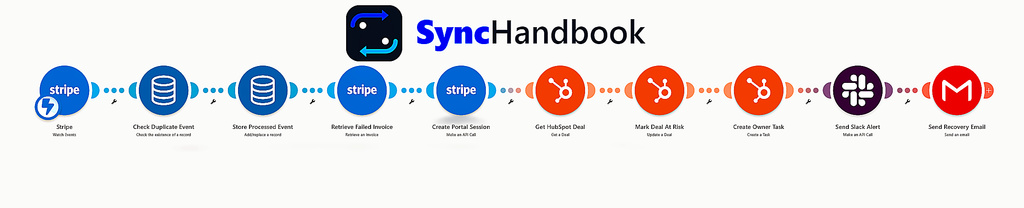
[Stripe: invoice.payment_failed]
│
▼
[Data Store: Idempotency Lock] ──► (Stop if already processing)
│
▼
[Stripe: Retrieve Full Invoice & Failure Details]
│
▼
[Stripe API: Generate Self-Service Customer Portal Session]
│
▼
[HubSpot: Retrieve Deal & Update Status to 'At-Risk']
│
▼
[HubSpot: Assign High-Priority Follow-Up Task to Deal Owner]
│
▼
[Slack: Route Operations Alert to #revops-dunning Channel]
│
▼
[Gmail: Deliver Transactional Recovery Email with Direct Update Link]
Prerequisites and Integration Endpoints
Before building the scenario in Make, verify access to the following permissions:
- Stripe: Restricted API Key with Write permissions to
Billing Portal Sessionsand Read permissions toInvoices,Customers, andPaymentIntents. - HubSpot: Super Admin access or OAuth token with
crm.objects.deals.read,crm.objects.deals.write, andcrm.objects.tasks.write. - Slack: Incoming Webhook or Bot Token (
chat:write) with access to your private#revops-dunningchannel. - Make Data Store: A persistent key-value store named
Dunning_Idempotency_Store.
Step-by-Step Module Configuration
Module 1: Stripe Watch Events (Webhook Trigger)
To prevent latency and avoid polling API limits, configure a dedicated Stripe webhook to listen for failed payment events.
- Module: Stripe > Watch Events
- Event Type:
invoice.payment_failed - Limit:
10
When an invoice payment fails, Stripe issues a webhook payload containing the invoice ID (in_xxxx), customer ID (cus_xxxx), and charge attempt count:
JSON

{
  "id": "evt_1P8kL2K5e...",
  "type": "invoice.payment_failed",
  "data": {
    "object": {
      "id": "in_1P8kL1K5e...",
      "customer": "cus_Q1a2b3c4d5",
      "amount_due": 240000,
      "attempt_count": 1,
      "next_payment_attempt": 1726056000,
      "payment_intent": "pi_3P8k...",
      "hosted_invoice_url": "[https://invoice.stripe.com/i/acct_xxx/](https://invoice.stripe.com/i/acct_xxx/)..."
    }
  }
}Modules 2 & 3: Make Data Store Deterministic Deduplication
Stripe webhooks follow an at-least-once delivery model. If your endpoint responds with anything other than a 200 OK within 5 seconds, Stripe will re-send the exact same webhook payload multiple times.
Without deduplication, your scenario will create duplicate tasks in HubSpot, spam your Slack channels, and send duplicate emails to your customer.
Module 2: Check Duplicate Event
- Module: Data Store > Check the existence of a record
- Data Store:
Dunning_Idempotency_Store - Key:
{{1.data.object.id}}_{{1.data.object.attempt_count}}
Filter: Is New Failure Event?
- Condition:
Key does not exist(Total records = 0)
Module 3: Store Processed Event
- Module: Data Store > Add/replace a record
- Key:
{{1.data.object.id}}_{{1.data.object.attempt_count}} - Values:
Invoice_ID:{{1.data.object.id}}Processed_At:{{now}}
Module 4: Stripe Retrieve Failed Invoice
The base webhook payload frequently strips nested charge failure data. To find out why the card failed (e.g., insufficient_funds, expired_card, or do_not_honor), pull the full expanded invoice record.
- Module: Stripe > Retrieve an Invoice
- Invoice ID:
{{1.data.object.id}}
This provides the exact error message under payment_intent.last_payment_error.message and the raw ISO decline code under payment_intent.last_payment_error.decline_code.
Step 5: Build an On-Demand Redirect Webhook (Scenario 2)
To completely eliminate the Session TTL (expiration) issue mentioned above, you must split your automation into two separate scenarios. The first scenario handles the initial failure and sends the email. The second scenario handles the link generation at the exact moment the customer clicks the button.
Create a new Make scenario with the following architecture:
- Custom Webhook (Trigger): This webhook receives the click from the email button. It will capture the
customer_idpassed in the URL parameters. - Stripe – Create a Customer Portal Session: Map the
customer_idreceived from the webhook to generate a fresh, unexpired portal URL. - Webhook Response: This is the most critical module. Configure the Webhook Response module to return an HTTP Status of
302(Redirect). In the Custom Headers section, add a new header with the KeyLocationand set the Value to the freshly generated Stripe Portal URL.
Result: The client clicks the link in an email that is 3 days old, triggers the webhook, a fresh session is instantly generated via API, and the browser seamlessly redirects them to their secure billing portal in milliseconds.
Modules 6 & 7: HubSpot CRM Deal Synchronization
When an enterprise account fails payment, the sales rep or Account Executive (AE) managing that renewal must have immediate visibility. If your sales pipeline already creates billing records automatically using our blueprint on How to Auto-Create QuickBooks Online Invoices from HubSpot Deals Using Make, tracking payment delinquency inside the same deal record ensures complete lifecycle visibility.
Module 6: Get HubSpot Deal
- Module: HubSpot > Search / Get a Deal
- Search Property:
stripe_customer_id(or query deals by associated contact email{{4.customer_email}})
Module 7: Mark Deal At Risk
- Module: HubSpot > Update a Deal
- Deal ID:
{{6.id}} - Properties to Update:
Payment Status:DelinquentAccount Health:At RiskInternal Notes:Payment attempt #{{4.attempt_count}} failed. Reason: {{4.payment_intent.last_payment_error.message}}
Module 8: HubSpot Create Owner Task
Never rely on passive dashboard reports. Create an explicit CRM task assigned directly to the deal owner with a 24-hour SLA. If your organization dynamically assigns accounts across sales pods, ensure deal ownership matches the logic covered in our guide on How to Build an Automated Lead Enrichment and Dynamic Round-Robin Routing Engine Using Make and HubSpot.
- Module: HubSpot > Create a Task
- Task Title: URGENT: Recover Failed Payment – {{6.properties.dealname}} (${{formatNumber(4.amount_due / 100; 2; “.”; “,”)}}) `
- Due Date:
{{addDays(now, 1)}} - Priority:
High - Assigned To (Owner):
{{6.properties.hubspot_owner_id}} - Notes:
- Customer Billing Email:
{{4.customer_email}} - Failure Code:
{{4.payment_intent.last_payment_error.decline_code}} - Direct Stripe Portal Link:
{{5.url}}
- Customer Billing Email:
Module 9: Slack Send Operations Alert
Send a high-priority card to your internal #revops-alerts or #finance-dunning channel so cross-functional teams have instant context.
- Module: Slack > Make an API Call (or Create a Message)
- Endpoint:
/chat.postMessage - Method:
POST - Request Body (Slack Block Kit JSON):
{
  "channel": "C05ABCDEF12",
  "text": "⚠️ Failed Payment: {{6.properties.dealname}}",
  "blocks": [
    {
      "type": "header",
      "text": {
        "type": "plain_text",
        "text": "🚨 Payment Failed: Subscription at Risk"
      }
    },
    {
      "type": "section",
      "fields": [
        {
          "type": "mrkdwn",
          "text": "*Customer:*\n{{6.properties.dealname}}"
        },
        {
          "type": "mrkdwn",
          "text": "*Amount Due:*\n${{formatNumber(4.amount_due / 100, 2, '.'; ';')}} {{upper(4.currency)}}"
        },
        {
          "type": "mrkdwn",
          "text": "*Attempt Count:*\n#{{4.attempt_count}}"
        },
        {
          "type": "mrkdwn",
          "text": "*Decline Reason:*\n`{{4.payment_intent.last_payment_error.decline_code}}`"
        }
      ]
    },
    {
      "type": "actions",
      "elements": [
        {
          "type": "button",
          "text": {
            "type": "plain_text",
            "text": "Open Stripe Customer"
          },
          "url": "[https://dashboard.stripe.com/customers/](https://dashboard.stripe.com/customers/){{4.customer}}"
        },
        {
          "type": "button",
          "text": {
            "type": "plain_text",
            "text": "Open HubSpot Deal"
          },
          "url": "[https://app.hubspot.com/contacts/](https://app.hubspot.com/contacts/){{6.portalId}}/deal/{{6.id}}"
        }
      ]
    }
  ]
}Module 10: Gmail Send Recovery Email
The final module sends an automated, highly personalized transaction email to the primary billing contact.
- Module: Gmail > Send an email
- To:
{{4.customer_email}} - Subject:
Action Required: Update billing details for {{6.properties.dealname}} - Content Type:
HTML - Message Body:
<p>Hello {{ifempty(4.customer_name; "there")}},</p>

<p>We were unable to process the recent renewal payment of <strong>${{formatNumber(4.amount_due / 100, 2, '.'; ';')}}</strong> for your account.</p>

<p><strong>Reason provided by the issuing bank:</strong> {{4.payment_intent.last_payment_error.message}}</p>

<p>To prevent any service interruption to your workspace, please update your payment method using the secure self-service link below:</p>

<p style="margin: 24px 0;">
  <a href="https://hook.eu1.make.com/your-unique-webhook-url?customer_id={{1.customer}}" target="_blank" rel="noopener noreferrer" style="background-color: #2563EB; color: #ffffff; padding: 12px 24px; text-decoration: none; border-radius: 6px; font-weight: 600; display: inline-block;">
    Update Billing Details →
  </a>
</p>

<p><em>Security note: This self-service billing link is temporary. If the link expires before you complete the update, please reply to this email to receive a fresh link.</em></p>

<p>If your team requires an updated W-9, revised invoice, or needs to switch to ACH / wire payment terms, reply directly to this email.</p>

<p>Best regards,<br>The Revenue Operations Team</p>According to official documentation, Stripe Customer Portal session URLs expire automatically after short periods (often within minutes) if unopened. Once accessed by the customer, the active session remains valid for user activity.
Because static session links embedded directly into asynchronous recovery emails frequently expire before a customer opens the message, production architectures should avoid generating raw portal URLs inside the initial invoice.payment_failed webhook. Instead, direct the customer to a secondary Make.com Webhook that acts as a 302 Redirect router, provisioning a fresh portal session exactly at the moment of the click.
Scenario 2 – Module 2: Stripe Create Portal Session
Never force enterprise customers to log in through multiple SSO layers just to update an expired billing card. Instead, generate a temporary, authenticated Stripe Customer Portal session URL.
- Module: Stripe > Make an API Call
- URL:
/v1/billing_portal/sessions - Method:
POST - Headers:
Content-Type:application/x-www-form-urlencoded
- Body (x-www-form-urlencoded):
customer={{1.customer_id}}&return_url="https://synchandbook.com/"(https://synchandbook.com/)Stripe returns an ephemeral session object containing a secure URL:
{
  "id": "bps_1P8KXYZ...",
  "object": "billing_portal.session",
  "created": 1726052400,
  "customer": "cus_Q1a2b3c4d5",
  "url": "https://billing.stripe.com/p/session/live_YWNjdF8"
}Production Verification & Handling Edge Cases
Before enabling the scenario in production, run test events against Stripe’s test card suite:
1. Test Against Specific Decline Codes
In Stripe Test Mode, trigger mock charges using test numbers designed to fail:
4000 0000 0000 0002: Generates a generic card decline (card_declined).4000 0000 0000 0069: Simulates an expired card (expired_card).4000 0000 0000 9995: Simulates insufficient funds (insufficient_funds).
Verify that the decline reason properly injects into both the Slack payload and the customer email.
2. Guard Against the Final Cancellation Race Condition
Stripe will retry payments according to your Smart Retries schedule. On the final failed attempt (typically attempt #4), Stripe can be configured to cancel the subscription automatically.
Add a simple router or filter between Module 1 and Module 2:
- If
{{1.data.object.attempt_count}} >= 4: Route to an emergency churn task (“Escalate to VP Sales & Legal for Immediate Contract Default”).
If an enterprise subscription enters permanent cancellation after all retries fail, your RevOps engine should automatically revoke workspace licenses and suspend tenant access—effectively the inverse operation of our playbook on How to Automate B2B Client Onboarding and Workspace Provisioning Using Make.
3. Link to Financial Reconciliation
Recovered payments flow directly into your standard bank payouts. Ensure your accounting team’s general ledger stays clean by pairing this dunning workflow with our guide on How to Automate Stripe Payout and Processing Fee Reconciliation in QuickBooks Online Using Make.